VBA – Wait, Delay, Create a Timer While Running Code

Written by

Reviewed by
Wait or Delay in VBA
There are many instances when a timer could be useful in Excel, here is one method to try:
Sub MyTimer()
Application.Wait Now + TimeValue("00:00:05")
MsgBox ("5 seconds")
End Sub
 A couple uses of a timer in Excel VBA are pausing code and measuring elapsed time. The following will take you to the respective place I’ve posted an example of each use:
1. Pause code execution for a desired amount of time with Application.Wait (simulating a timer)
link: Hide Excel
2. Measure elapsed time with a Timer in VBA
If you are looking to benchmark re-written code or debate “quicker” methods in VBA you can use VBA’s built-in timer. Setting a variable equal to the timer at the start of your code and subtracting this from the timer at the end will give you a good estimate of how long a piece of code takes to run.
Performance may be affected by other programs running or trying to run while you’re macro is active, among other things.
The following example was used to see how long it would take to write the word “test” to cell A1 on Sheet1 a half million times. It took 21 seconds on my machine.
Sub BenchMark()

Dim Count As Long
Dim BenchMark As Double

BenchMark = Timer

'Start of Code to Test

For Count = 1 To 500000
    Sheet1.Cells(1, 1) = "test"
Next Count

'End of Code to Test

MsgBox Timer - BenchMark

End Sub
If your code is running slow, try speeding it up by disabling screen updating.
VBA Coding Made Easy
Stop searching for VBA code online. Learn more about AutoMacro – A VBA Code Builder that allows beginners to code procedures from scratch with minimal coding knowledge and with many time-saving features for all users!
Wait or Delay in Access VBA
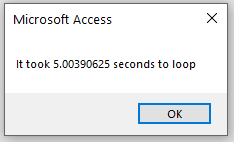
You can also use the methods above in Access VBA. For example, you might like to know how long it takes to move through a recordset.
Sub LoopThroughRecords()
   Dim Count As Long
   Dim BenchMark As Double
   BenchMark = Timer
'Start of Code to Test
   Set dbs = CurrentDb
   Set rst = dbs.OpenRecordset("tblInvoices", dbOpenDynaset)
   With rst
      Do Until .EOF = True
        .MoveNext
      Loop
   End With
'End of Code to Test
   MsgBox "It took " & Timer - BenchMark & " seconds to loop"
End Sub