VBA – Display Status Bar Message

Written by

Reviewed by
In this Article
At the bottom-left corner of Excel, you’ll find a Status Bar:
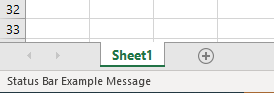
Excel uses this status bar to communicate messages to you. However the StatusBar Property can also be adjusted using VBA, allowing you to display your own messages.
Custom Status Bar Message
You can update the status bar with your own custom message in Excel while a macro is running, using the StatusBar property.
1. Place this code in a macro whenever you want to update the user with a custom status bar message:
Application.StatusBar = "I'm working Now!!!"2. And at the end of your macro place this code to clear the status bar and return control back to Excel:
Application.StatusBar = FALSE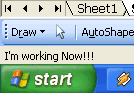
Disable Status Bar Updating
Instead of displaying a message while your procedure runs, you can disable the Status Bar. This will increase the speed of your VBA code as Excel can skip processing what Status Bar message to display.
To disable Status Bar updating while your code is running set the DisplayStatusBar property to false.
Application.DisplayStatusBar = FalseAt the end of your code, restore Status Bar updating:
Application.DisplayStatusBar = TrueImportant! Use the StatusBar property to set messages, but use the DisplayStatusBar property to disable or enable the status bar altogether.
Speed Up VBA Code
For optimal processing speed try using this code:
sub RunFast()

Application.ScreenUpdating = False
Application.DisplayStatusBar = False
Application.EnableEvents = False
ActiveSheet.DisplayPageBreaks = False
Application.Calculation = xlCalculationManual

'Your Code Here

Application.ScreenUpdating = True
Application.DisplayStatusBar = True
Application.EnableEvents = True
ActiveSheet.DisplayPageBreaks = True
Application.Calculation = xlCalculationAutomatic
end sub
VBA Coding Made Easy
Stop searching for VBA code online. Learn more about AutoMacro – A VBA Code Builder that allows beginners to code procedures from scratch with minimal coding knowledge and with many time-saving features for all users!