
VLOOKUP Function Example
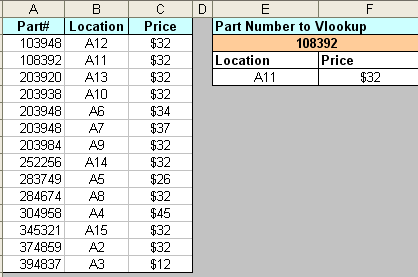
Let’s take a look at the VLOOKUP function. In our example we have a company with a list of part numbers, along with information about them. Let’s asssume this list is very long, and they would like to enter a part# in a cell and have it return information about that part quickly.
This picture shows our desired result. In the orange cell we enter a part number, then the location and price will automagically display
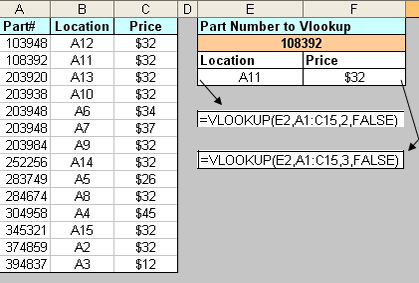
So how do we accomplish this? Here is the VLOOKUP in layman’s syntax
=VLOOKUP(CellToLookup ,RangeToLookIn, WhichColumnToReturn, ExactMatch?)
And now in practice:
1. We need a list of data sorted by the first column.
2. In a blank cell that we would like to return a result from the list, type =VLOOKUP(
3. Click on the cell where we will enter the value to lookup (this will enter the cell in your formula)
4. Hit , (comma)
4. Click and drag to select the entire list including headers
6. Hit, (comma)
7. Type the numerical value of the column you would like to return (A=1, B=2, C=3,,,,)
8. Hit ,(comma)
9. Type “False” and hit enter
Sidenote: Enter “TRUE” to find an approximate match, one reason you might use approximation is on data with Typos or poor standards, for example “MR Man” and it’s actually “MR. Man”.
Sidenote: This works across multiple worksheets. If you would like to store your data in one sheet, and your VLOOKUP in another, it’s the same process.

Get answers right away at our AE Excel Support Forums!


Your site has given me the clearest possible explanation of some excel functions….Thanks.
YOUR GRAPHICAL REPRESENTATION IS VERY USEFUL EVERYONE SHOULD KNOW THIS FUNCTION IS QUICKLY
very very great site, its concept so clear that any one can learn anththing in excel
very ver thanks
Really-Really your site gives us answer with satisfactory. If you have your book about M.S.Excel formulas in hindi version then tell me by mail.
Thank
Gopal Singh Rawt
Excellent clarity on the formula
Thanks to a very good example on VLOOKUP Function
it is really helpful for students to analyse the problem with some easy examples
thanks a lot
From this wonderful example I can say I am able to use vlookup
From this Example I got a clear idea, how to use VLOOKUP function
Amazing example of vlookup… it gives me more idea on how to use excel…
very easily absorb….thanks a lot sir
Very good example of excel functions
wonderful example
Thanks for nice example.
VLookup has been very clearly explained. Thank you very much.
However when there is no data, my cell shows as #NA. How do we eliminate that and make it an empty cell.
Hi All,
Please help me to preparing a formula to get the following data in ms excel:
month Name sal_Claim Sal_Paid
July Anita 50000 40000
July Binita 45000 41000
July Ranita 48000 45000
August Anita 55000 51000
August Binita 45200 43000
August Ranita 47500 45000
If I enter month in cell B15 & Name in Cell B16 then I would like to get Salary Claimed in Cell B18 & Sal_paid in Cell B19.
Plz help.
i got a clear idea abt vlookup from u r simple example.. bravo..!!
thatnks dude. thank u verymuch
thanks so much for this tip, graphical representation always helps a lot
Dear Writer,
Thank you a lot to share you valueable information in very simple way.
Thanks again.
Obaid-ur-Rehman
Karachi- Pakistan
Really Great !! Learning Excel is so easy from your nice website
– Shashi
This site is very usefull for students !!!
big thanks!please continue to help others.
hey, Ravish.. i have a solution for our problem….very simple….if u want to eliminate #NA…type the following..=if(istext(cell value,vlookup(cell value,cell range, column to return,false),”")
and your cell will be blank if nothing is entered.
how to locate vlookup?
Excellent clarity in formulas.
Keep it up..
Awesome example dude…..this explanation has helped me a lot ….thanks…
Very well its indeed help me alot and give me more clarity, Thank you so much bro.
And now in practice:
1. We need a list of data sorted by the first column.
2. In a blank cell that we would like to return a result from the list, type =VLOOKUP(
3. Click on the cell where we will enter the value to lookup (this will enter the cell in your formula)
4. Hit , (comma)
4. Click and drag to select the entire list including headers
6. Hit, (comma)
7. Type the numerical value of the column you would like to return (A=1, B=2, C=3,,,,)
8. Hit ,(comma)
9. Type “False” and hit enter
VERY EASY TO LEARN AND IT HELPED ME A LOT
It’s very good tutorial, very easy to understand and specified…
very very great site, its concept so clear that any one can learn anththing in excel
very ver thanks
I can not understand please send with attachment
Hi,
I am trying to find a solution through Vlookup function, can someone help?
I have two sheets (sheet1 and sheet2), I need to vlookup A1 of Sheet1 in Sheet2 D3, E3, F3 after CONCATENATEING (A3:D1), (A3:E1), (A3:F1) cells and put corresponding values in Sheet1 F2, F3 etc. Please refer to the attached file.
Anticipating quick response.
Pramod
Pramod can u give more glimpse on this or attach sheet with example
please send me some critical examples i need to make some file which required all datas in 1 excel sheet. from that i need to get somany different reports.
swift reply will be appreciated.
puros khan
I am getting #NA error message. my look-up criterea cell has formula. for Example
Scenario 1 Sales (manually entered number by sales rep Scenario 1 Sales per head(manually entered number by
$350,000.00 0.23 percentage furmula
$250,000.00 0.17percentage furmula
$300,000.00 0.20percentage furmula
900,000.00 0.60 This is formula and looking table=0.60 getting #NA error
Xcelent examples , Its really very fantastic….Its help me so much…thnx a lot…
Thanks,
this is really useful
Aman
Vlookup Find to search unique record so we can’t use this for same month
First time I used this site to help, it was great & will use it for all may ecxel questions
superb help
thxx a ton !!!!
best and easiest way to learn
good
