VBA – 右クリックのメニューにマクロを登録する


Last updated on 8月 1, 2022
右クリックでマクロを呼び出す
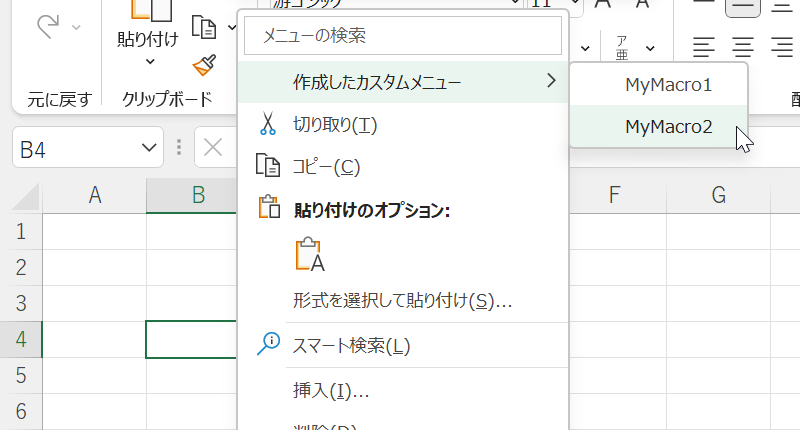
ユーザーがセルを右クリックした後に表示されるデフォルトのメニューからマクロを選択できるようにするためのコードを以下に示します。
1. 次のコードをThisWorkbookのコードウィンドウに記述します。
Private Sub Workbook_Open()

Dim MyMenu As Object

Set MyMenu = Application.ShortcutMenus(xlWorksheetCell) _
    .MenuItems.AddMenu("作成したカスタムメニュー", 1)

With MyMenu.MenuItems
    .Add "MyMacro1", "MyMacro1", , 1, , ""
    .Add "MyMacro2", "MyMacro2", , 2, , ""
End With

Set MyMenu = Nothing

End Sub
2. 次のコードをモジュールに入れる
Public Sub MyMacro1()

MsgBox "右クリックメニューからマクロ1"

End Sub

Public Sub MyMacro2()

MsgBox "右クリックメニューからマクロ2"

End Sub
3.ワークブックを閉じて、もう一度開いてください
VBAのコーディングが簡単に
VBAのコードをオンラインで検索するのはもうやめましょう。AutoMacro – A VBA Code Builderは、初心者が最小限のコーディング知識でゼロからコーディングできるだけでなく、すべてのユーザーにとって時間を節約するのに役立つ多くの機能を備えています!  もっと詳しく