VBA – ワークシートのハイパーリンクメニューを作成する


Last updated on 8月 1, 2022
ワークブック内の全ワークシートのハイパーリンクインデックスを作成する
ワークブック内のすべてのシートをリストアップするマクロをさらに一歩進めて、ワークブック内の各シートへのハイパーリンクメニューを作成してみましょう。これは、シートの数が多く、それぞれへのハイパーリンクのメニューを手作業で作ろうとしている人にとっては、とても時間の節約になります。
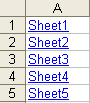
このマクロを使うには、コード中のSheet1という単語(2回出てきます)を、結果を表示させたいタブ名に置き換えるだけです。出力タブに書き込む前にデータをクリアしてしまうので、出力タブに重要な情報がないことを確認してください。マクロが実行されると、各シートのリストが作成され、各シートへのハイパーリンクが作成されます。
Sub ListSheets()

Dim ws As Worksheet
Dim x As Integer

x = 1

Sheets("Sheet1").Range("A:A").Clear

For Each ws In Worksheets

   Sheets("Sheet1").Cells(x, 1).Select
   ActiveSheet.Hyperlinks.Add _
   Anchor:=Selection, Address:="", SubAddress:= _
   ws.Name & "!A1", TextToDisplay:=ws.Name
   x = x + 1

Next ws

End Sub
VBAのコーディングが簡単に
VBAのコードをオンラインで検索するのはもうやめましょう。AutoMacro – A VBA Code Builderは、初心者が最小限のコーディング知識でゼロからコーディングできるだけでなく、すべてのユーザーにとって時間を節約するのに役立つ多くの機能を備えています!  もっと詳しく