


VBA – Turn Formula Bar Off (or On)

Written by

Reviewed by
In this Article
When creating an Excel template you may want to turn off the formula bar to limit unwanted user actions.
Alternatively, if you are using a spreadsheet and the formula bar is missing you may want to turn it back on.
Turn Formula Bar On or Off From Excel
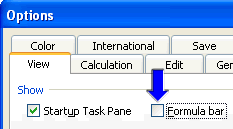
To toggle the formula bar On or Off:
On the Ribbon:
1. Click View
2. Check or Uncheck “Formula Bar” in the Show section
or you can use keyboard shortcuts: Alt > W > V > F
Turn Formula Bar On or Off with VBA
To do this from VBA:
Macro to turn off the formula bar
Sub OffFormulaBar()
    Application.DisplayFormulaBar = False
End Sub
Macro to turn on the formula bar
Sub OnFormulaBar()
    Application.DisplayFormulaBar = True
End Sub
Expand or Collapse Formula Bar
You can also resize the Formula Bar by clicking and dragging at the bottom of the formula bar or by using this shortcut: CTRL + SHIFT + U (MAC: ^ + Shift + U).
VBA Coding Made Easy
Stop searching for VBA code online. Learn more about AutoMacro – A VBA Code Builder that allows beginners to code procedures from scratch with minimal coding knowledge and with many time-saving features for all users!



