


VBA – Change (or Clear) a Cell’s Background Color

Written by
Reviewed by
In this Article
This tutorial will demonstrate how to change (or clear) a cell’s background color using VBA.
Change Cell Background Color with Interior.colorindex
To change a cell’s background color with VBA you can use the Interior.ColorIndex property.
This example uses the ColorIndex property along with the Range() method:
Range("A2").Interior.ColorIndex = 5This example uses the Cells() method:
Cells(2, 1).Interior.ColorIndex = 15Of course, it’s not obvious what color the number corresponds to. One option is to reference our Color Reference For Colorindex, but we will demonstrate other alternatives.
Interior.Color to Change Cell Color
One alternative is to use the Interior.Color property to set the cell color. When using Interior.Color, you can use the more intuitive colors of vbRed, vbBlack, vbYellow, etc. instead of numbers.
<<example>>
However, your options are limited to just a few colors.
So unless, you’re using one of the basic colors, I recommend recording a Macro to generate the code to change the cell color…
Macro to Change Cell Color
When you want to use VBA to adjust Excel formatting (including changing a cell’s background color), I recommend recording a macro first. By recording a macro, you can quickly get the desired code for the formatting you want. Follow these steps to record a macro:
- Make sure the Developer Ribbon Tab is enabled.
- Go to Developer > Record Macro to start the recording
- Go to the Home Ribbon and set your desired formatting
- Go to Developer > Stop Recording to stop recording.
Next we’ll edit the Macro.
- Go to Developer > Macros
- Click on the newly credit Macro and then click Edit
You should see something like this:
<<picture>>
This code will change the background color of the selection. Instead of the selection, usually, you’ll want to define a specific range (or use logic to determine which range) to color. If so, make the following change to your code:
<<picture>>
Here we’ve used the Range Object to highlight cells A1:A10.
Next we’ll assign the Macro to a button so that we can change the color colors by clicking the button.
Go to Developer > Insert and choose Button
<<picture>>
Then click the worksheet to add the button. You’ll see menu appear to assign a macro to a button. Choose the recently recorded macro and click OK.
<<picture>>
Now you can change the color of cells B1:B10 with a mouse-click.
Change Cell Color If
You might want to add in logic to only change the cell background color of cells that meet certain criteria. Here is an example of this:
<<code…. picture>>
This macro will change the background color to red for any cell with a negative value. This macro was created with AutoMacro with the following steps
- Go to the Loops Menu, Select Cells > Highlight > Negative values.
- Choose to insert the Macro as a button.
Clear Cell Color
VBA code can change the format of cells, including the background color. You can remove any format, including background color that may have been previously set on a cell.
To clear a cell’s color, select the cells where you wish to remove the background color.
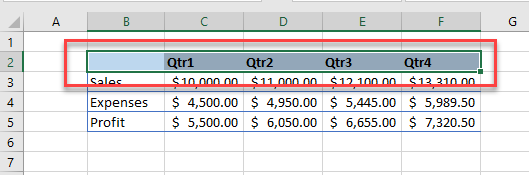
Run the following macro:
Sub RemoveCellColor()
   Selection.Interior.Color = xlNone
End Sub
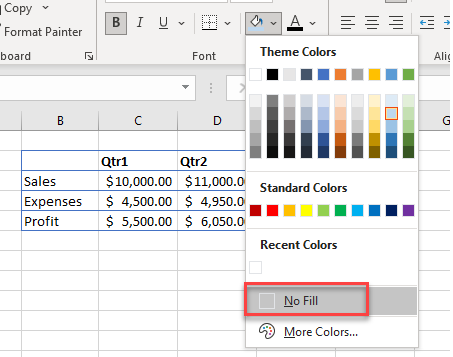
This is equivalent to selecting No Fill from the Background color drop down in the Ribbon.
If you were to record a macro to remove the background color, you may get the following code being created:
Sub RemoveColor()
  With Selection.Interior
    .Pattern = xlNone
    .TintAndShade = 0
    .PatternTintAndShade = 0
  End With
End Sub
This macro would perform the exact same function as the one above, but the one above is more efficient in that it is only one line of code!
If you wish to remove the background color on a specific range of cells, we can use this code below:
Sub RemoveCellColor()
  Range("B2:F2").Interior.Color = xlNone
End Sub
or, if you wish to use a variable, this code will do the same thing!
Sub RemoveCellColor()
  Dim rng As Range
  Set rng = Range("B2:F2")
  rng.Interior.Color = xlNone
End Sub

************link not working for color index!!!!***************

