
Watch Movies In a Spreadsheet
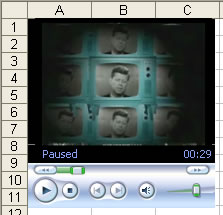 Watch or listen to movies in Excel, while you work in Excel:
1. On the main menu click Insert->Object
2. Select Windows Media Player from the Object Type box and hit OK
3. Move and resize the WMP to your liking
Note: If you can’t resize the WMP object, switch to “Design Mode” by clicking the design mode button 
Now we’ll add some code to tell the Windows Media Player object to Play and what file to play. Open the Visual Basic Editor(alt+F11), double click the worksheet that contains the WMP you just inserted and Paste the following code:
Sub PlayMovie()

'URL is the location of the movie - change appropriately

WindowsMediaPlayer1.URL = "C:/rb.wmv"

WindowsMediaPlayer1.Controls.Play

End Sub
Play the movie just as you would run a Macro: Tools->Macro->Macros
You may also want to create a couple of shortcuts to Hide and Stop playing the Movie if the boss approaches. Add the following code below the previous code:
Sub HideQuick()

WindowsMediaPlayer1.Visible = False

WindowsMediaPlayer1.Controls.pause

End Sub


Sub ShowQuick()

WindowsMediaPlayer1.Visible = True

WindowsMediaPlayer1.Controls.Play

End Sub
Next add shortcuts to the 2 macros (Tools->Macro->Macros->Options) and you have an instant ON/OFF switch at your fingertips.
 SideNote: While watching a movie directly in Excel is interesting, my favorite way to watch a movie while working is using the stand alone Media Player with a few different options set.
From the Tools->Options menu check the box “Display On Top when in Skin Mode”. From the View menu select “Skin Mode” (a small skin works best). Move your movie to the bottom right or left of your screen.
With this setup I can work and also switch between apps and always have my movie visible, yet out of the way. Thanks to Kingzter.