Sorting Data in Excel VBA

Written by

Reviewed by
In this Article
- Sort Data with Excel VBA
- Practical Use of the Sort Method in VBA
- Sample Data to Demonstrate Excel Sorting with VBA
- Recording a Macro for a VBA Sort
- VBA Code to do a Single Level Sort
- VBA Code to do a Multi-Level Sort
- Sorting by Cell Color
- Sorting by Font Color
- Using Other Parameters in VBA Sorting
- Extending the Sorting Function Using VBA
Sort Data with Excel VBA
Excel has an excellent means of sorting a range of tabular data using the ribbon on the Excel front end, and at some point, you will probably want to use this functionality within your VBA code. Fortunately, this is very easy to do.
The front-end dialog box is found by clicking the ‘Sort’ icon in the ‘Sort & Filter’ group of the ‘Data’ tab on the Excel ribbon. You need to select a range of tabular data first.
You can also use Alt-A-S-S to show the dialog box for a custom sort.
The sort method has been greatly improved in later versions of Excel. The sort used to be restricted to three levels, but you can now enter as many levels as your need, and this also applies within VBA.
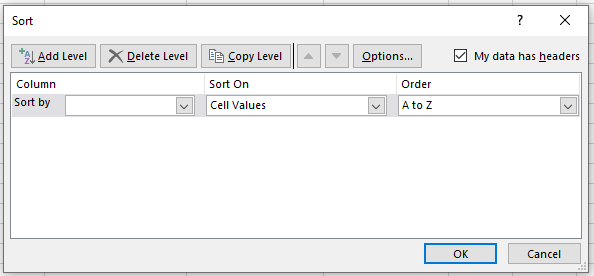
You can incorporate all the sort functions on offer in the Excel Sort dialog into your VBA code. The sort function in Excel is fast, and quicker than anything that you could write yourself in VBA, so take advantage of the functionality.
Note that when you do a sort in VBA, the sort parameters remain the same in the front-end sort dialog box. They also are saved when the workbook is saved.
If a user selects the same range of tabular data and clicks on the Sort icon, they will see all your parameters that have been entered by your VBA code. If they want to do a sort of their own design, then they will have to delete all your sort levels first, which will be very annoying for them.
Also, if you do not change the parameters within your code, and rely on default values, you may find that the user has made changes which will reflect through into your VBA sort, and may give unexpected results, which may be very difficult to debug.
Fortunately, there is a Clear method in VBA to re-set all the sort parameters so that the user will see a clean sort dialog box
Worksheets("Sheet1").Sort.SortFields.ClearIt is good practice to clear the sort parameters in VBA before and after the sort has been completed.
Practical Use of the Sort Method in VBA
When tabular data is imported into Excel, it is often in a very random order. It could be imported from a CSV (comma separated values) file or it could come from a link to a database or web page. You cannot rely on it being in a set order from one import to another.
If you are presenting this data to a user within your worksheet, the user may well find it difficult to look at and understand a huge amount of data which in terms of order is all over the place. They may want to group the data, or cut and paste certain sections of it into another application.
They may also want to see, for example, the highest paid employee, or the employee with the longest service.
Using the Sort method in VBA, you can offer options to allow easy sorting for the user.
Sample Data to Demonstrate Excel Sorting with VBA
We first need some sample data to be entered into a worksheet, so that the code can demonstrate all the facilities available within VBA.
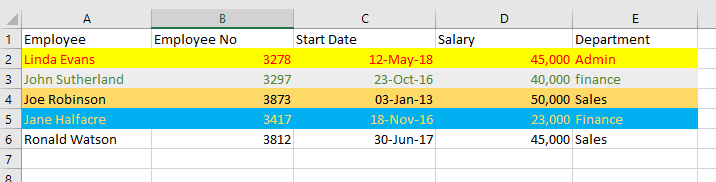
Copy this data into a worksheet (called ‘Sheet1’) exactly as shown.
Note that different cell background colors and font colors have been used, as these can also be used as sorting parameters. Sorting using cell and font colors will be demonstrated later in the article. Also note that on cell E3, the department name is all lower case.
You do not need the cell interior and font colors if you do not wish to use the examples of sorting by cell and font color.
Recording a Macro for a VBA Sort
VBA code for sorting can get quite complicated, and it can sometimes be a good idea to do the sort on the front end of Excel and record a macro to show you how the code works.
Unfortunately, the recording function can generate a huge amount of code because it sets virtually every parameter available, even though the default values for many parameters are acceptable to your sort operation.
However, it does give you a very good idea of what is involved in writing VBA sort code, and one advantage is that the recorded code will always work for you. Your own code may need testing and debugging to make it work properly.
Remember that for an operation done in VBA, there is no undo feature, so it is a good idea to make a copy of the tabular data onto another worksheet before you start writing your sorting code.
As an example, if you did a simple sort on the sample data above, sorting by Employee, the recording would generate the following code:
Sub Macro1()

Range("A1:E6").Select

ActiveWorkbook.Worksheets("Sheet1").Sort.SortFields.Clear
ActiveWorkbook.Worksheets("Sheet1").Sort.SortFields.Add2 Key:=Range("A2:A6"), _
    SortOn:=xlSortOnValues, Order:=xlAscending, DataOption:=xlSortNormal

With ActiveWorkbook.Worksheets("Sheet1").Sort
    .SetRange Range("A1:E6")
    .Header = xlYes
    .MatchCase = False
    .Orientation = xlTopToBottom
    .SortMethod = xlPinYin
    .Apply
End With

End Sub
This is quite a large chunk of code, and a lot of it is unnecessary because of default parameters being used. However, if you are under time pressure to complete a project and you need some code quickly that works, you can easily paste this into your own VBA code.
However, if you want to make your code understandable and more elegant, then there are other options available.
VBA Code to do a Single Level Sort
If you want to sort the sample code based on Employee only as before when recording a macro, the code is very simple:
Sub SingleLevelSort()

Worksheets("Sheet1").Sort.SortFields.Clear

Range("A1:E6").Sort Key1:=Range("A1"), Header:=xlYes

End Sub
This is far easier to understand than the recorded code because it accepts the defaults, e.g., sort ascending, so there is no need to set the parameters to default values. This assumes that you have used a ‘Clear’ statement beforehand.
The ‘Clear’ method is used initially to ensure that every sort parameter for that worksheet is set back to the default values. A user may have previously set the parameters to different values, or an earlier sort in VBA may have changed them. It is important to start from a default position when sorting, otherwise you could easily end up with incorrect results.
The Clear method does not reset the Header parameter, and it is advisable to include this in your code, otherwise Excel may try and guess whether a header row is present or not.
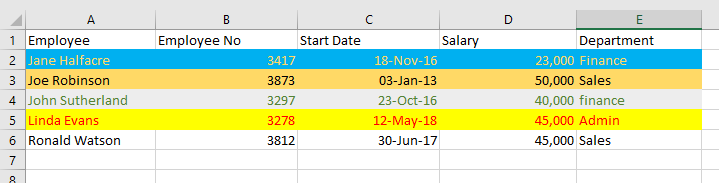
Run this code against the sample data and your worksheet will look like this:
VBA Code to do a Multi-Level Sort
You can add in as many sorting levels as required within your code. Suppose that you wished to sort first by department and then by start date but in ascending order for the department and descending order for start date:
Sub MultiLevelSort()

Worksheets("Sheet1").Sort.SortFields.Clear

Range("A1:E6").Sort Key1:=Range("E1"), Key2:=Range("C1"), Header:=xlYes, _
    Order1:=xlAscending, Order2:=xlDescending

End Sub
Note that there are now two keys in the sort statement (Key1 and Key2). Key1 (Department column E) is sorted first of all and then Key2 (Start Date column C) is sorted based on the first sort.
There are also two order parameters. Order1 associates with Key1 (Department) and Order2 associates with Key2 (Start Date). It is important to ensure that keys and orders are kept in step with each other.
Run this code against the sample data and your worksheet will look like this:
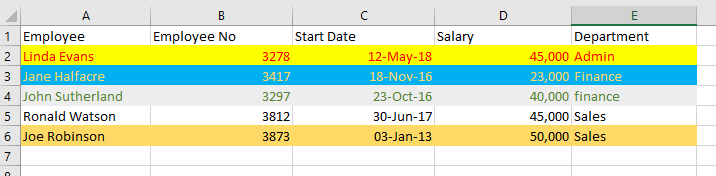
The Department column (E) is in ascending order, and the Start Date column (C) is in descending order.
The effect of this sort is most noticeable when looking at Jane Halfacre (row 3) and John Sutherland (row 4). They are both in Finance but Jane Halfacre started before John Sutherland and the dates are shown in descending order.
If the range of tabular data could be of any length, you can use the UsedRange object to define the sort range. This will only work if there is only the tabular data on the worksheet as any values outside of the data will give incorrect results for the number of rows and columns.
Sub MultiLevelSort()

Worksheets("Sheet1").Sort.SortFields.Clear
Worksheets("Sheet1").UsedRange.Sort Key1:=Range("E1"), Key2:=Range("C1"), Header:=xlYes, _
    Order1:=xlAscending, Order2:=xlDescending

End Sub
This prevents the problem if you use the method ‘End(xlDown)’ to define the sort range. If there is a blank cell in the middle of the data, then anything after the blank cell will not be included, whereas UsedRange goes down to the last active cell in the worksheet.
Sorting by Cell Color
Since Excel 2007, sorting by the background color of a cell is now possible, which provides enormous flexibility when designing your sort code in VBA.
Sub SingleLevelSortByCellColor()

Worksheets("Sheet1").Sort.SortFields.Clear
ActiveWorkbook.Worksheets("Sheet1").Sort.SortFields.Add2 Key:=Range("A2:A6"), _
    SortOn:=xlSortOnCellColor, Order:=xlAscending, DataOption:=xlSortNormal

With ActiveWorkbook.Worksheets("Sheet1").Sort
    .SetRange Range("A2:E6")
    .Apply
End With

End Sub
This code will sort the sample data range (A2:A6) based on the cell background color. Note that there is now an additional parameter called ‘SortOn’ which has the value of ‘xlSortOnCellColor’.
Note that the ‘SortOn’ parameter can only be used by a worksheet object and not by a range object.
Because of this the code is more complicated than for a sort using cell values.
This code uses a key value for the sort which covers the whole range of data but you can specify individual columns as the key for the background color sort, and use multiple levels as shown earlier.
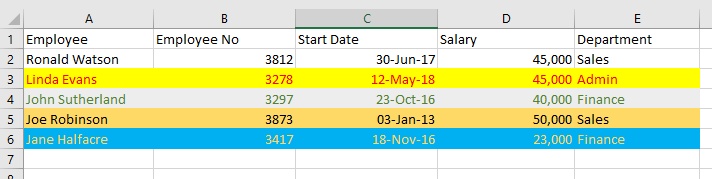
After running this code, your worksheet will now look like this:
Sorting by Font Color
The sort function in Excel VBA offers even more flexibility in that you can sort by font colors:
Sub SingleLevelSortByFontColor()

Worksheets("Sheet1").Sort.SortFields.Clear
ActiveWorkbook.Worksheets("Sheet1").Sort.SortFields.Add(Range("A2:A6"), _
    xlSortOnFontColor, xlAscending, xlSortNormal).SortOnValue.Color = RGB(0, 0, 0)

With ActiveWorkbook.Worksheets("Sheet1").Sort
    .SetRange Range("A1:E6")
    .Header = xlYes
    .Orientation = xlTopToBottom
    .Apply
End With

End Sub
The code for sorting by font color is far more complicated than for the cell background color. The ‘SortOn’ parameter now holds the value of ‘xlSortOnFontColor’.
Note that you must specify orientation as ‘xlTopToBottom’ and you must specify a color to sort on. This is specified in RGB terms (Red, Green, Black) with values going from 0 to 255.
After running this code against the sample data, your worksheet will now look like this:
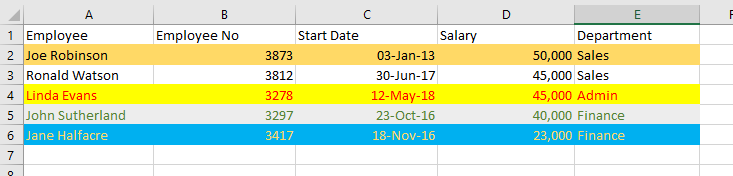
Sorting using colors in VBA is far more complicated than a multi-level sort, but if your sort code will not work (which can happen if a parameter is missing or you have not entered the code correctly) then you can always fall back on recording a macro and integrating the recorded code into your VBA.
Using Other Parameters in VBA Sorting
There are a number of optional parameters that you can use in your VBA code to customize your sort.
SortOn
SortOn chooses whether the sort will use cell values, cell background colors, or cell font colors. The default setting is Cell Values.
SortOn = xlSortOnValuesOrder
Order chooses whether the sort will be done in ascending or descending order. The default is Ascending.
Order = xlAscendingDataOption
DataOption chooses how text and numbers are sorted. The parameter xlSortNormal sorts numeric and text data separately. The parameter xlSortTextAsNumbers treats text as numeric data for the sort. The default is xlSortNormal.
DataOption = xlSortNormalHeader
Header chooses whether the tabular data range has a header row or not. If there is a header row, you do not want this included in the sort.
Parameter values are xlYes, xlNo, and xlYesNoGuess. xlYesNoGuess leaves it to Excel to determine if there is a header row, which could easily lead to inconsistent results. Use of this value is not recommended.
The default value is XNo (no header row within the data). With imported data, there is usually a header row, so make sure that you set this parameter to xlYes.
Header = xlYesMatchCase
This parameter determines whether the sort is case-sensitive or not. Option values are True or False. If the value is False, then lower case values are considered the same as upper case values. If the value is True, then the sort will show the difference between upper and lower case values within the sort. The default value is False.
MatchCase = FalseOrientation
This parameter determines whether the sort will take place downwards through the rows, or across all the columns. The default value is xlTopToBottom (sort through rows). You can use xlLeftToRight if you wish to sort horizonally. Values such as xlRows and xlColumns do not work for this parameter.
Orientation = xlTopToBottomSortMethod
This parameter is only used for sorting Chinese languages. It has two values, xlPinYin and xlStroke. xlPinYin is the default value.
xlPinYin sorts using the phonetic Chinese sort order for characters. xlStroke sorts by the quantity of strokes in each character.
If you record a sort macro, this parameter will always be included in the code, and you may well have wondered what it meant. However, unless you are dealing with data in Chinese, it is of little use.
SortMethod = xlPinYinUsing a Double-Click Event to Sort Tabular Data
In all the functionality that Microsoft included in the sort methods for VBA, it did not include a simple means to double-click on a column header and sort the whole of the tabular data based on that particular column.
This is a really useful feature to have, and it is easy to write the code to do it.
Private Sub Worksheet_BeforeDoubleClick(ByVal Target As Range, Cancel As Boolean)
'Assumption is made that data begins at cell A1

'Create three variables to capture the target column selected and the maximum column and row of _
'   the tabular data
Dim Col As Integer, RCol As Long, RRow As Long

'Check that the user has double-clicked on the header row – row 1 otherwise exit sub
If Target.Row <> 1 Then Exit Sub

'Capture the maximum rows in the tabular data range using the ‘UsedRange’ object
RCol = ActiveSheet.UsedRange.Columns.Count

'Capture the maximum columns in the tabular data range using the 'UsedRange' object
RRow = ActiveSheet.UsedRange.Rows.Count

'Check that the user has not double-clicked on a column outside of the tabular data range
If Target.Column > RCol Then Exit Sub

'Capture the column that the user has double-clicked on
Col = Target.Column

'Clear away previous sort parameters
ActiveSheet.Sort.SortFields.Clear

'Sort the tabular range as defined by maximum rows and columns from the 'UsedRange' object
'Sort the tabular data using the column double-clicked by the user as the sort key
ActiveSheet.Range(Cells(1, 1), Cells(RRow, RCol)).Sort Key1:=Cells(1, Col), Header:=xlYes

'Select cell A1 – this is to ensure that the user is not left in edit mode after the sort is _
'   completed
ActiveSheet.Range("A1").Select

End Sub
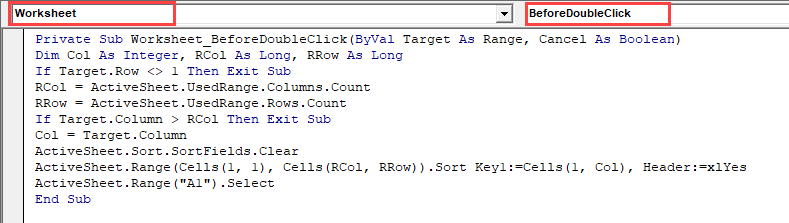
This code needs to be placed on the double-click event on the sheet containing the tabular data. You do this by clicking on the worksheet name in the Project Explorer window (top-left hand corner of the VBE screen), and then selecting ‘Worksheet’ in the first drop down on the code window. Select ‘BeforeDoubleClick’ in the second drop down, and you can then enter your code.
Note that no names, ranges, or cell references are hardcoded into this code except for moving the cursor to cell A1 at the end of the code. The code is designed to get all the information required from the cell coordinates that the user has double-clicked on and the size of the tabular data range.
It does not matter how large the tabular data range is. The code will still pick up all the required information and it can be used on data held anywhere within your workbook without having to hardcode in values.
The only assumption made is that there is a header row in the tabular data, and that the data range starts at cell A1, but the starting position for the data range can be easily changed within the code.
Any user will be suitably impressed with this new sorting functionality!
VBA Programming | Code Generator does work for you!
Extending the Sorting Function Using VBA
Microsoft has allowed tremendous flexibility in sorting using a wide range of parameters. However, within VBA, you can take this further.
Suppose that you wanted to sort any values with a bold font to the top of your data. There is no way to do this in Excel, but you can write the VBA code to do it:
Sub SortByBold()

'Create variables to hold the number of rows and columns for the tabular data
Dim RRow As Long, RCol As Long, N As Long

'Turn off screen updating so that the user cannot see what is happening – they may see _
'   values being altered and wonder why
Application.ScreenUpdating = False

'Capture the number of columns in the tabular data range
RCol = ActiveSheet.UsedRange.Columns.Count

'Capture the number of rows within the tabular data range
RRow = ActiveSheet.UsedRange.Rows.Count

'Iterate through all the rows in the tabular data range ignoring the header row
For N = 2 To RRow
    'If a cell has a bold font then place a leading 0 value against the cell value
    If ActiveSheet.Cells(N, 1).Font.Bold = True Then
        ActiveSheet.Cells(N, 1).Value = "0" & ActiveSheet.Cells(N, 1).Value
    End If
Next N

'Clear any previous sort parameters
ActiveSheet.Sort.SortFields.Clear

'Sort the tabular data range. All the values with a leading 0 value will move to the top
ActiveSheet.Range(Cells(1, 1), Cells(RRow, RCol)).Sort Key1:=Cells(1, 1), Header:=xlYes

'Iterate through all the rows in the tabular data range ignoring the header row
For N = 2 To RRow
    'If a cell has a bold font then remove the leading 0 value from the cell value to _
    '   restore the original values
    If ActiveSheet.Cells(N, 1).Font.Bold = True Then
        ActiveSheet.Cells(N, 1).Value = Mid(ActiveSheet.Cells(N, 1).Value, 2)
    End If
Next N

'Turn screen updating back on
Application.ScreenUpdating = True

End Sub
The code works out the size of the tabular data range using the ‘UsedRange’ object and then iterates through all the rows within it. When a bold font is found, a leading zero is placed in front of the cell value.
A sort then takes place. As the sort is in ascending order, anything with a zero in front will go to the top of the list.
The code then iterates through all the rows and removes the leading zeroes, restoring the data to its original values.
This code sorts using bold fonts as a criterion, but you could easily use other cell characteristics in the same way, e.g., italic font, point size of text, underscore font, font name, etc.