

Image Control Problem – Can’t LoadPicture() from URL
Most web services I’ve played with don’t return images themselves, they return the url address of the image. So having a robust image control that I can drop on to my spreadsheet and manipulate at run time, to load an image from a URL, is almost mandatory.
Is this currently missing from Excel, or is it a bug with the current image control, or did I just overlook something? Here’s the problem:
Inserting a picture from a url at run time is a breeze:
ActiveSheet.Pictures.Insert( _ "http://www.automateexcel.com/media/msftstock.gif").Select
But who wants to just insert the image, which doesn’t have many options, I want a control, so I add an Image control from the VB toolbox called Image1 and use the standard code found on 50 or so websites:
Sheet1.Image1.Picture = LoadPicture( _ "http://www.automateexcel.com/media/msftstock.gif")
ERROR!!! A 10 minute project turned into an hour and a half of researching to no avail. And to add insult to injury, F1 help for Image control, a control that’s been around 9 or so years looks like this:
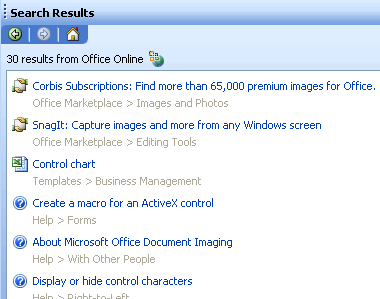
No wonder people diss on F1, the first two results are advertisements for the MS marketplace, and image control is nowhere to be found.
I did find a few hacks using api’s,sockets? and things, but that’s not acceptable. Oh well. I’ll probably see a checkbox I forgot to check in the morning LoL


Hi Mark,
LoadPicture() doesn’t work with a unc reference, as I’m sure you now know
How about using the WebBrowser control instead.
Sheet1.WebBrowser1.Navigate “http://www.automateexcel.com/media/msftstock.gif”
Yeah, that could really help the control. Here’s a wrapped function for it just in case:
http://www.mrexcel.com/board2/viewtopic.php?t=120559
Thanks Andy,
“as I’m sure you now know”, I wouldn’t assume anything,hahaha,
the web browser seems like a good second choice, I haven’t tried it yet for my situation, however I think image control should be the best solution, for instance I can’t stretch the image in a web browser control.
I suppose MS overlooked this small detail in their smart client strategy: A large part of webservices is images, however there is no proper control to display them in Excel
Juan,
That’s amazing you could come up with that solution, even more amazing there was a reason you had to
Thanks for the link,
Thanks again guys,
I think the web browser control wins, however it’s still not an image control
If you search MSDN for WinHTTPRequest, you can set up a formal HTTP request for the image.
Does this work for you? It is located in:
MSDN Home > MSDN Library > Win32 and COM Development > Network Protocols > Windows HTTP Services (WinHTTP) > Windows HTTP Services (WinHTTP) > Using WinHTTP > Using the WinHttpRequest COM Object
http://msdn.microsoft.com/library/default.asp?url=/library/en-us/winhttp/http/retrieving_data_using_visual_basic.asp
Awesome, thanks Joerd
It may be a few before I can dig in, but thanks for the info, it may also hold some keys to this.
Hi Mark,
Funny I ran into the same short comming of the LOADPICTURE() function and couldn’t find a solution either.
Regards,
Marcel
Pretty nice site, wants to see much more on it!
Yeah me too. Working on getting new content at the moment.
This website is Great! I will recommend you to all my friends. I found so much useful things here. Thank you.t
Thanks so very much for taking your time to create this very useful and informative site. I have learned a lot from your site. Thanks!!



