Excel VBAで検索と置換を使う


In this Article
このチュートリアルでは、Excel VBAでFindメソッドとReplaceメソッドを使用する方法を説明します。
Excelの検索
Excelには、優れた検索と置換のツールが組み込まれています。 これらは、CTRL + F(検索)またはCTRL + H(置換)のショートカット、またはリボンメニューから起動することができます。ホーム > 編集 > 検索と選択
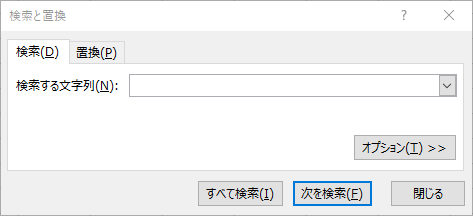
[オプション]をクリックすると、高度な検索オプションが表示されます。
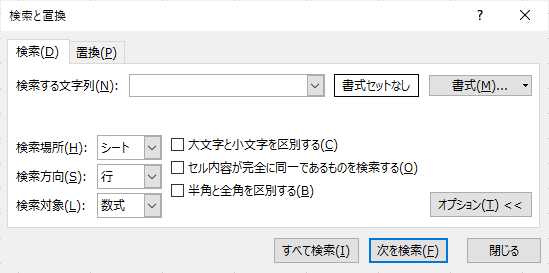
VBAを使用して、これらの検索と置換の両方のメソッドに簡単にアクセスすることができます。これらの組み込みメソッドは、VBAで自分で記述するよりもはるかに高速です。
検索VBAの例
検索機能のデモとして、Sheet1 に次のようなデータセットを作成しました。
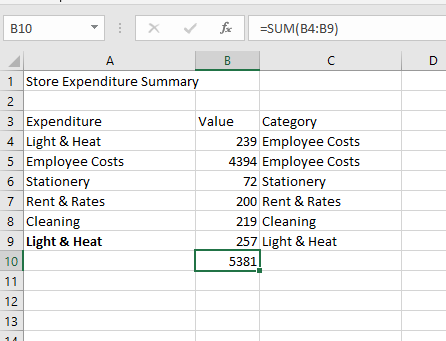
このデータを自分のワークブックに入力してみてください。
VBA オプションパラメータを指定しない検索
VBAのFindメソッドを使用する場合、設定できるオプションのパラメーターがたくさんあります。
Findメソッドを使用するときは、すべてのパラメータを定義することを強くお勧めします。
オプションのパラメータを定義しない場合、VBAはExcelの検索ウィンドウで現在選択されているパラメータを使用します。つまり、コードを実行したときに、どの検索パラメータが使用されているかが分からない場合があるのです。直前の検索では、ワークブック全体に対してか、1つのシートに対して実行したのかも分かりません。数式と値のどちらを検索したかも分かりません。Excelの検索ウィンドウで現在何が選択されているかを手動で確認しない限り、知る術はありません。
この状況を分かりやすく説明するために、オプションのパラメータを定義しない例から見てみましょう。
簡単な検索の例
簡単なFindを使った例を見てみます。
Sub TestFind()
Dim MyRange As Range

Set MyRange = Sheets("Sheet1").UsedRange.Find("employee")
MsgBox MyRange.Address
MsgBox MyRange.Column
MsgBox MyRange.Row

End Sub
Sheet1のUsed Rangeから “employee “を検索するコードです。見つかると、最初に見つかった範囲をRage型の変数MyRangeに代入しています。
次に、見つかったテキストのあるセルのアドレス、列、行がメッセージボックスで表示されます。 この例では、デフォルトの検索設定を使用しています。(Excelの検索ウィンドウで検索関連の設定が変更されていないと仮定しています)
- 検索文字列とセル値の部分一致(セルの完全一致は必要ない)
- 大文字と小文字は区別されません。
- 検索は1つのワークシートのみを対象とする
これらの設定は、様々なオプションのパラメータ(後述)を使って変更することができます。
検索方法に関する注意事項
- 検索は、テキストが見つかったセルを選択しません。 検索された範囲を特定するだけで、コード内で操作することができます。
- Findメソッドは、最初に見つかったインスタンスの場所のみを特定します。
- ワイルドカード(*)を使用することができます。
何も見つからなかった場合
検索文字列が存在しない場合、Rangeオブジェクトは空のままです。これは、コードがロケーションの値を表示しようとしたときに、それらが存在しないため、大きな問題、つまりあなたが望まないエラーを引き起こします。 幸いなことに、VBAではIs演算子を使って空のRangeオブジェクトをテストすることができます。
If Not MyRange Is Nothing Then前の例にコードを追加します。
Sub TestFind()
Dim MyRange As Range

Set MyRange = Sheets("Sheet1").UsedRange.Find("employee")
If Not MyRange Is Nothing Then
    MsgBox MyRange.Address
    MsgBox MyRange.Column
    MsgBox MyRange.Row
Else
    MsgBox "見つかりませんでした"
End If
End Sub
検索パラメータ
ここまでは、Findメソッドの基本的な使用例を見てきました。 しかし、検索を絞り込むために、いくつかのオプションのパラメータが用意されています。
| パラメータ | タイプ | 説明 | 値 |
| What | 必須 | 検索する値 | 文字列や数値など任意のデータ型 |
| After | 任意 | 検索を開始する位置(単一のセル参照) | セルのアドレス |
| LookIn | 任意 | 検索の対象を指定 | xlValues, xlFormulas, xlComments |
| LookAt | 任意 | マッチする条件(セル全体または一部のみ) | xlWhole, xlPart |
| SearchOrder | 任意 | 検索する順序(行または列) | xlByRows, xlByColummns |
| SearchDirection | 任意 | 検索する方向(前方または後方) | xlNext, xlPrevious |
| MatchCase | 任意 | 大文字と小文字を区別するかどうか | TrueまたはFalse |
| MatchByte | 任意 | 半角と全角を区別するかどうか | TrueまたはFalse |
| SearchFormat | 任意 | セルの書式を検索するかどうか | TrueまたはFalse |
After パラメータと複数の値の検索
Afterパラメータを使用して、検索の開始セルを指定します。これは、検索する値のインスタンスが複数ある場合に便利です。 検索ですでに一つの値が見つかり、さらに多くの値が見つかることがわかっている場合、Findメソッドに「After」パラメータを指定して最初のインスタンスを記録し、そのセルを次の検索の開始点として使用することができます。 これを利用して、検索テキストの複数のインスタンスを検索することができます。
Sub TestMultipleFinds()
Dim MyRange As Range, OldRange As Range, FindStr As String

'"Light & Heat"が含まれる最初のセルを検索する
Set MyRange = Sheets("Sheet1").UsedRange.Find("Light & Heat")

'見つからなければ終了する
If MyRange Is Nothing Then Exit Sub

'最初に見つかったアドレスを表示する
MsgBox MyRange.Address

'範囲オブジェクトのコピーを作成する
Set OldRange = MyRange

'アドレスを"|"文字で区切った文字列に追加する
FindStr = FindStr & "|" & MyRange.Address

'他のインスタンスを探すために範囲を繰り返し実行する
Do
    '前に見つかったアドレスをAfterパラメータとして使用して検索する
    Set MyRange = Sheets("Sheet1").UsedRange.Find("Light & Heat", After:=Range(OldRange.Address))を実行します。

    'アドレスが既に見つかっている場合は、Doループを終了する - これで連続ループが停止する
    If InStr(FindStr, MyRange.Address) Then Exit Do

    '見つかった最新のアドレスを表示
    MsgBox MyRange.Address

    '最新の住所を住所録の文字列に追加する
    FindStr = FindStr & "|" & MyRange.Address

    '現在の範囲をコピーする
    Set OldRange = MyRange
Loop
End Sub
このコードは、使用されている範囲を繰り返し処理し、「Light & Heat」がを見つけるたびにアドレスを表示します。 このコードは FindStr で重複するアドレスが見つかるまで繰り返し、その後にDo ループを終了します。
LookIn パラメータ
LookIn パラメータを使用すると、セル内のどのコンポーネントを検索するかを指定できます。 セル内の値、数式、コメントなどを指定することができます。
- xlValues – セルの値(計算後のセルの最終値)を検索します。
- xlFormulas – セルの数式(セルに入力されたもの)そのものを検索します。
- xlComments – セルのノート内を検索します。
- xlCommentsThreaded – セルのコメント内を検索します。
ワークシートに数式が入力されていると仮定して、このサンプルコードを使用すると、任意の数式の最初の場所を見つけることができます。
Sub TestLookIn()
Dim MyRange As Range

Set MyRange = Sheets("Sheet1").UsedRange.Find("=", LookIn:=xlFormulas)
If Not MyRange Is Nothing Then
    MsgBox MyRange.Address
Else
    MsgBox "見つかりませんでした"
End If
End Sub
LookInパラメータがxlValuesに設定されている場合、このコードでは「見つかりませんでした」とメッセージボックスに表示します。この例では、B10を返します。
LookAt パラメータの使用
LookAtパラメータは、Findメソッドが完全に一致するセルを検索するか、検索値を含む任意のセルを検索するかを決定します。
- xlWhole – 検索値と一致するセル全体が必要です。
- xlPart – 検索文字列のセル内を検索します。
このコード例では、テキスト「light」を含む最初のセルを検索します。Lookat:=xlPartを指定すると、「Light & Heat」に一致するセルが返されます。
Sub TestLookAt()
Dim MyRange As Range
Set MyRange = Sheets("Sheet1").UsedRange.Find("light", Lookat:=xlPart)
If Not MyRange Is Nothing Then
    MsgBox MyRange.Address
Else
    MsgBox "見つかりませんでした"
End If
End Sub
xlWholeが設定されている場合、セルの値が “light “である場合のみマッチングが返されます。
SearchOrder パラメータ
SearchOrder パラメータは、範囲内でどのように検索を行うかを指定します。
- xlRows – 検索は行ごとに行う
- xlColumns – 検索は列ごとに行う
Sub TestSearchOrder()
Dim MyRange As Range
Set MyRange = Sheets("Sheet1").UsedRange.Find("employee", SearchOrder:=xlColumns)
If Not MyRange Is Nothing Then
    MsgBox MyRange.Address
Else
    MsgBox "見つかりませんでした"
End If
End Sub
これは、どのマッチが最初に見つかるかに影響します。
先ほどのワークシートに入力されたテストデータを使って、検索順序が列(xlColumns)の場合、位置するセルはA5です。 検索順序のパラメータをxlRowsに変更すると、位置するセルはC4となります。
これは、検索範囲内に重複する値があり、特定の列名で最初のインスタンスを見つけたい場合に重要です。
SearchDirection パラメータ
SearchDirectionパラメータは、検索を行う方向(前方または後方)を指定します。
- xlNext – 範囲内で次に一致する値を検索します。
- xlPrevious – 範囲内で前に一致する値を検索します。
繰り返しになりますが、検索範囲内に重複する値がある場合、どちらが先に見つかるかに影響を与える可能性があります。
Sub TestSearchDirection()
Dim MyRange As Range

Set MyRange = Sheets("Sheet1").UsedRange.Find("heat", SearchDirection:=xlPrevious)
If Not MyRange Is Nothing Then
    MsgBox MyRange.Address
Else
    MsgBox "見つかりませんでした"
End If
End Sub
このコードをテストデータに使用すると、xlPreviousの検索方向はC9の場所を返します。 xlNextパラメータを使用すると、A4という場所が返されます。
Nextパラメータは、検索範囲の左上から下に向かって検索することを意味します。Previousパラメータは、検索が検索範囲の右下隅から始まり、上向きに動作することを意味します。
MatchByte パラメータ
MatchByeパラメータは、中国語、ロシア語、日本語など、各文字を表すのに2バイトを使用する言語に対してのみ使用されます。
日本語環境では、このパラメータをTrueに設定すると、全角と半角を区別して検索します。このパラメータをFalseに設定すると、全角と半角を区別しません。
SearchFormat パラメータ
SearchFormatパラメータを使用すると、一致するセル形式を検索することができます。これは、使用されている特定のフォント、または太字のフォント、またはテキストの色などです。 このパラメータを使用する前に、Application.FindFormatプロパティで検索に必要なフォーマットを設定する必要があります。
以下は、その使用方法の例です。
Sub TestSearchFormat()
Dim MyRange As Range

Application.FindFormat.Clear
Application.FindFormat.Font.Bold = True
Set MyRange = Sheets("Sheet1").UsedRange.Find("heat", Searchformat:=True)
If Not MyRange Is Nothing Then
    MsgBox MyRange.Address
Else
    MsgBox "見つかりませんでした"
End If
Application.FindFormat.Clear
End Sub
この例では、FindFormatプロパティは、太字のフォントを探すように設定されています。Findステートメントでは、SearchFormatパラメータをTrueに設定して「heat」という単語を検索し、フォントが太字の場合にのみそのテキストのインスタンスを返します。
先ほど示したワークシートのサンプルデータでは、「heat」という単語を太字で含む唯一のセルであるA9が返されます。
コードの最後に、FindFormatプロパティがクリアされていることを確認してください。 そうしないと、次の検索でもこのことが影響し、意図しない結果となることがあります。
SearchFormatパラメータを使用する場合、検索値としてワイルドカード(*)を使用することもできます。 この場合、太字のフォントを持つすべての値が検索されます。
Set MyRange = Sheets("Sheet1").UsedRange.Find("*", Searchformat:=True)複数のパラメータを使用する
ここで説明したすべての検索パラメータは、必要に応じて互いに組み合わせて使用することができます。
例えば、’LookIn’ パラメータと ‘MatchCase’ パラメータを組み合わせて、セルテキスト全体を検索することができますが、大文字小文字は区別されます。
Sub TestMultipleParameters()
Dim MyRange As Range
Set MyRange = Sheets("Sheet1").UsedRange.Find("Light & Heat", LookAt:=xlWhole, MatchCase:=True)
If Not MyRange Is Nothing Then
    MsgBox MyRange.Address
Else
    MsgBox "見つかりませんでした"
End If
End Sub
この例では、コードはA4を返しますが、例えば’heat’のようにテキストの一部だけを使用した場合、セルの値全体をマッチングしているため、何も見つかりません。 また、大文字と小文字が一致しないため、失敗します。
Set MyRange = Sheets("Sheet1").UsedRange.Find("heat", LookAt:=xlWhole, MatchCase:=True)Excel VBAで置換する
Excel VBAには、ご想像の通り、Replace関数があります。これは、「Find」と非常によく似た働きをしますが、見つかったセルの位置の値を新しい値に置き換えるものです。 これらはReplaceメソッドステートメントで使用できるパラメータです。 これらは、「Find」メソッド文と全く同じように動作します。 Find」と唯一違うのは、Replacementパラメータを指定する必要があることです。
| 名前 | タイプ | 説明 | 値 |
| What | 必須 | 検索する値 | 文字列や数値などの任意のデータ型 |
| Replacement | 必須 | 置換する文字列 | 文字列や数値などの任意のデータ型 |
| LookAt | 任意 | マッチする条件(セル全体または一部のみ) | xlPartまたはxlWhole |
| SearchOrder | 任意 | 検索する順序(行または列) | xlByRows または xlByColumns |
| MatchCase | 任意 | 大文字と小文字を区別するかどうか | TrueまたはFalse |
| MatchByte | 任意 | 半角と全角を区別するかどうか | TrueまたはFalse |
| SearchFormat | 任意 | セルの書式を検索するかどうか | TrueまたはFalse |
| ReplaceFormat | 任意 | セルの書式を置換するかどうか | TrueまたはFalse |
ReplaceFormatパラメータは、FindメソッドのSearchFormatパラメータと同じように、太字などの特定の書式を持つセルを検索するものです。先に示したFindのサンプルコードにあるように、まずApplication.FindFormatプロパティを設定する必要があります。
オプションのパラメータを指定しない置換
最も簡単なのは、検索するものと、それを置換するものを指定するだけです。
Sub TestReplace()
Sheets("Sheet1").UsedRange.Replace What:="Light & Heat", Replacement:="L & H"
End Sub
Findメソッドはマッチした値の最初のインスタンスのみを返しますが、Replaceメソッドは指定された範囲全体を処理し、マッチしたものをすべて置き換えることに注意してください。 この置換コードでは、UsedRangeオブジェクトで定義されたセル範囲全体を通して、「Light & Heat」のすべてのインスタンスを「L & H」に置き換えます。
VBAを使ったテキスト文字列の検索と置換
上記の例は、VBAを使用してExcelのデータを操作する場合には非常に有効です。しかし、VBAの文字列を操作するには、INSTRやREPLACEといったVBAの組み込み関数を使用することができます。 INSTR関数を使用して、長い文字列の中の文字列を見つけることができます。
Sub TestInstr()
MsgBox InStr("This is MyText string", "MyText")
End Sub
このサンプルコードでは、検索対象の文字列の中でMyTextが見つかった番号の位置である9という値が返されます。 大文字と小文字は区別されることに注意してください。
MyTextがすべて小文字の場合は、検索文字列が見つからなかったことを意味する値0が返されます。以下では、大文字と小文字の区別を無効にする方法について説明します。
INSTR – 開始位置
さらに2つのオプションのパラメータが用意されています。 検索の開始点を指定することができます。
MsgBox InStr(9, "This is MyText string", "MyText")開始位置が9と指定されているので、やはり9が返されます。 もし、開始位置が10であれば、0(マッチしない)を返します。
INSTR – 大文字と小文字を区別する
CompareパラメータをvbBinaryCompareまたはvbTextCompareに設定することもできます。このパラメータを設定した場合、ステートメントには開始パラメータ値が必要です。
- vbBinaryCompare – 大文字小文字を区別する (デフォルト)
- vbTextCompare – 大文字小文字を区別しない
MsgBox InStr(1, "This is MyText string", "mytext", vbTextCompare)このステートメントは、検索テキストが小文字であっても、9を返します。 大文字と小文字を区別しないようにするには、コードモジュールの先頭でOption Compare Textを宣言する方法もあります。
VBA Replace関数
もし、コード内で文字列内の文字を別のテキストに置き換えたい場合は、Replaceメソッドが最適です。
Sub TestReplace()
MsgBox Replace("This is MyText string", "MyText", "My Text")
End Sub
このコードでは、’MyText’を’My Text’に置き換えています。 バイナリ比較がデフォルトなので、検索文字列は大文字と小文字が区別されることに注意してください。 また、他のオプションのパラメータを追加することもできます。
- Start – 最初の文字列の中で、置換が開始される位置を指定します。Findメソッドとは異なり、Startパラメータで指定された位置から後ろの文字列を切り取って返します。
- Count – 置換の回数を指定します。 デフォルトでは、置換は見つかった検索テキストのすべてのインスタンスを変更しますが、Countパラメータを1に設定すると、置換する個数を1個に制限できます。
- Compare – Findメソッドと同様に、vbBinaryCompareまたはvbTextCompareを使用してバイナリ検索またはテキスト検索を指定できます。 バイナリは大文字と小文字を区別し、テキストは大文字と小文字を区別しません。
MsgBox Replace("This is MyText string (mytext)", "MyText", "My Text", 9, 1, vbTextCompare)このコードは「My Text string (mytext)」を返します。これは、与えられた開始位置が9であるため、新しく返される文字列は9文字から始まるからです。 Count パラメータが 1 に設定されているので、最初の ‘MyText’ だけが変更されています。
Replaceメソッドは、O’Flynnのようなアポストロフィを含む人名などの問題を解決するのに理想的です。もし、文字列の値を定義するのに一重引用符を使っていて、アポストロフィがある場合、コードはアポストロフィを文字列の終わりと解釈して、残りの文字列を認識しないため、エラーになります。
Replaceメソッドを使用すると、アポストロフィを何もない状態に置き換え、完全に除去することができます。