VBAデータ型の概要 – 変数と定数


In this Article
VBAのデータ型 – 変数と定数
このVBAチュートリアルは、変数と定数とは何かという概念を理解するのに役立ちます。これらはVBAだけでなく、すべてのプログラミング言語において知っておくべき重要なことです。 プログラミングの学習を始めるなら、変数と定数が何であるか、そしてそれらをどのようにコードで使用するかを理解する必要があります。
変数とは?
変数とは、コードで宣言した値のことで、コンピュータのメモリに確保され、保存されます。変数には名前を付ける必要があり、変数のデータ型も宣言しておくとよいでしょう。データ型を宣言すると、変数に格納する必要があるデータの種類をプログラムに伝えることになります。 あなたはコードの中で変数を使用し、プログラムも変数にアクセスすることになります。変数の実際の値は、コードの実行中に変更することができます。 VBAでは、変数を宣言するためにDimステートメントを使用します。VBAで変数を宣言する方法は、以下のコードに示されています。
Sub DeclaringAVariable()

Dim product_Name As String
Dim number_of_Products as Integer

End Sub
宣言文を作成したら、変数を初期化します。変数の宣言は、コンピュータのメモリに領域を確保するだけだからです。変数を初期化すると、変数に初期値を代入することになります。VBAで変数を初期化する方法は、以下のコードで示されています。
Sub InitializingAVariable()

Dim number_of_Products As Integer
number_of_Products = 5000

End Sub
VBAでは、変数名を付ける場合に以下のルールがあります。
– 予約キーワードでないこと。VBAにはDim、Private、Function、Loopなどの予約キーワードがあり、コード内で使用するキーワードにちなんだ変数名を付けることはできません。
– 変数名には、!、@、&、.、#、スペースなどの特殊文字は使えません。
– 変数名の長さは、255文字を超えてはいけません。
– また、変数名の先頭を数字で始めることもできません。
VBAで使用できるさまざまな一般的なデータ型
VBAで使用できるデータ型はたくさんあります。しかし、コードの大部分で使用することになる一般的なデータ型があります。それらは以下の通りです。
– String(文字列型) – これは、テキスト値を格納するために使用されます。
– Boolean(ブール型) – TRUE または FALSE 値を格納するために使用されます。
– Integer(整数型) – これは整数の値を格納するために使用されます。
– Double(倍精度浮動小数点型) – 小数を含む数値を格納するために使用されます。
– Date(日付型) – これは、日付を格納するために使用されます。
注:Stringデータ型に値を格納する場合、引用符を使用する必要があります。
Dim product_Name as String
product_Name = "ABC製品"
注:Dateデータ型に値を格納する場合も、引用符を使用する必要があります。
Dim start_date as Date
start_date = "1/4/2019"
VBAの全データ型の表
| データ型 | 使用メモリ量 | 値の範囲 |
|---|---|---|
| Byte (バイト型) | 1 バイト | 0から255 |
| Integer (整数型) | 2 バイト | -32,768 から 32,767 |
| Single (単精度浮動小数点数型) | 4バイト | -3.402823E38 から -1.401298E-45 (負の値)
1.401298E-45 から 3.402823E38 (正の値) |
| Long (長整数型) | 4バイト | -2,147,483,648 から 2,147,483,648 |
| Double (倍精度浮動小数点型) | 8 バイト | -1.79769313486232e+308 から -4.94065645841247E-324 (負の値)
4.94065645841247E-324 から 1.79769313486232e+308 (正の値) |
| Decimal (10進数型) | 14 バイト | +/-±79,228,162,514,264,337,593,543,950,335 (小数点なしの場合)
±7.9228162514264337593543950335 (小数点以下は28桁まで) |
| Date (日付型) | 8バイト | 100年1月1日 から 9999年12月31日 |
| Currency (通貨型) | 8 バイト | -922,337,203,685,477.5808 から 922,337,203,685,477.5807 |
| String(文字列型(可変長)) | 文字列長+10バイト | 0 から 20億文字 |
| String(文字列型(固定長)) | 文字列長 | 1 から 約65,400 |
| Object(オブジェクト型) | 4バイト | VBAにおけるオブジェクト |
| Boolean(ブール型) | 2バイト | 真か偽 |
変数データ型の使用
変数のデータ型について確信が持てない場合、または変更する必要がありそうな場合は、バリアントデータ型を使用することができます。 バリアントデータ型は、固定長のStringデータ型以外のあらゆる種類のデータを格納することができます。バリアントデータタイプは次のように宣言します。
Dim myValue as VariantVBAでOption Explicitを使用する
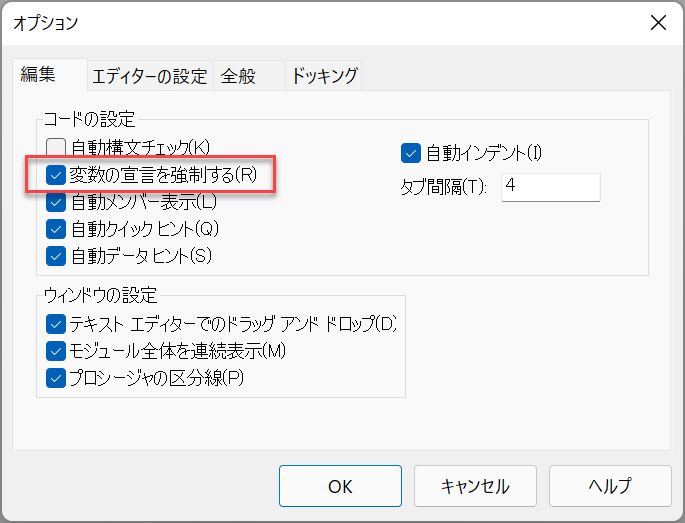
VBAでOption Explicitを使用するとき、これはすべての変数を宣言しなければならないことを意味し、そうすることは良いアイデアです。Excel VBEが自動的にOption Explicitを追加するようにするには、ツール > オプション > 編集へと進み、「変数の宣言を強制する」をチェックします。
コードで変数を使用する
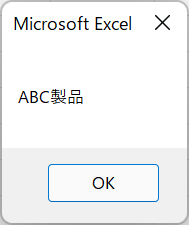
以下の例では、上記で説明したすべての概念を示しています。
Sub UsingVariablesInYourCode()

Dim product_Name As String
product_Name = "ABC製品"
MsgBox product_Name

End Sub
結果は次のようになります。
定数とは?
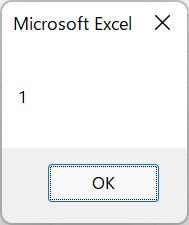
定数は変数と似ていますが、変更できない値を格納します。VBAで定数を宣言する方法は、以下のコードに示されています。
Sub DeclaringAConstant()
Constant NumberofDays = 1
MsgBox NumberofDays
End Sub
結果は次のようになります。
注:定数をPrivateとして宣言すると、そのモジュール内でのみ使用できますが、Publicとして宣言すると、他のモジュールでも使用できるようになります。