

VBA: Unhide All Worksheets
If you suspect there are hidden worksheets in a workbook:
1. Open the VB editor (alt & F11)
2. In the Project Explorer, expand the Project for your workbook
3. Expand the Excel objects for your workbook
Do you see more sheets listed in the Project Explorer than appear in your workbook?
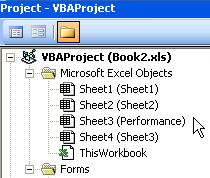
If the answer is Yes, it’s most likely because one or more sheets are hidden.
The following is a macro to unhide all worksheets in a workbook. Right click in the Project Explorer, select insert module, place this code in the module and run it:
Sub UnhideAll()
Dim WS As Worksheet
For Each WS In Worksheets
WS.Visible = True
Next
End Sub
Can't get the tutorial to work for you? Need help with your code?
Get answers right away at our AE Excel Support Forums!


You don’t need to add a module for a small, temporary macro like this.
In the immediate window, type this line and press Enter:
For Each WS in Worksheets : WS.Visible = True : Next
Much faster.
Good point Jon.
My stubornness towards the immediate window and msgbox habits have been tough ones to conquer. Thanks.
The code works OK if you can get into the project, but how would you approach the problem if the author had used VBA to set the visible properties of the hidden sheets to “xlVeryHidden” and then locked and passcoded the project? — Just a thought.
John,
You make a good point, I made the assumption the workbook was unprotected. I’m unaware of how to accomplish this with a protected project.
I made this, one of thoes thing you start, but never finish: It work ok, but needs more work, which i might do one day.
It was not for opening up xlveryhiden from closed projects but it seemed to work when i tested, might be worth a try?
let me know
Ross: if you feel like it, post the code and we’ll give it a whirl….
also, one can use a vba “crack” tool if they are desperate to open a locked VBA project (I hear avprp.exe never fails).
Dam it i thought i posted the link – i uploaded the file and all sorts sorry!
http://www.freewebs.com/methodsinexcel/MIE_SheetViewer_Alpha_.zip
Ross,
You have a reference to Rich TextBox Control 6.0 in the add-in that causes an error on my XP/2003 system. No problem though because there is an option to uncheck the reference, and it doesn’t appear the addin uses it anyway because it works perfectly after clearing the reference.
You are 100% correct……….I suppose a this is a universal way to run new code on a VBA protected worksheet; simply place the code you desire to run in another workbook, save as an addin, then import the addin into the protected sheet. Good stuff.
Thanks for the Tip.
Here is article that shows how to create an easy Userform to hide unhide selected sheets in Excel
http://vbacentral.blogspot.com/2009/11/excel-hidingunhiding-sheets-using-user.html
You rock man thanksssssssss
if we create an object of Excell and next get that object,by GetObject,we hide or unhide
Set ObjEXCELL = CreateObject(“Excel.Sheet”)
ObjEXCELL.Application.Workbooks.Open ExcellFileName
Set ObjEXCELL = GetObject(ExcellFileName)
…
…
ObjEXCELL.Save
ObjEXCELL.Close



