
AutoMacro: The Ultimate VBA add-in for easy Excel Automation.
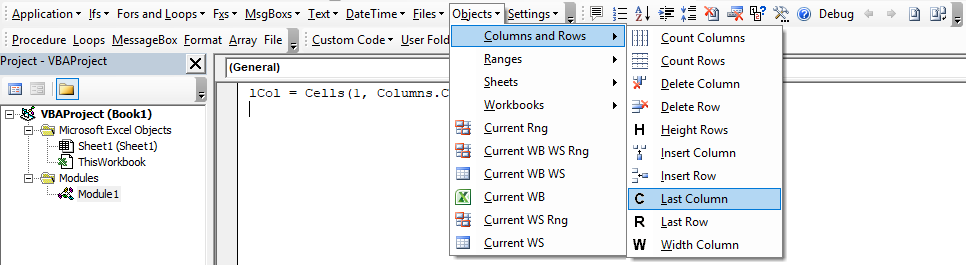

1000s of Excel / VBA Tutorials
| Function | Description |
|---|---|
| New Functions | |
| UNIQUE | Returns a list of unique values in a list or range |
| XLOOKUP | Replaces VLOOKUP, HLOOKUP, and INDEX / MATCH |
| Logical | yes |
| AND | Checks whether all conditions are met. TRUE/FALSE |
| IF | If condition is met, do something, if not, do something else. |
| IFERROR | If result is an error then do something else. |
| NOT | Changes TRUE to FALSE and FALSE to TRUE. |
| OR | Checks whether any conditions are met. TRUE/FALSE |
| XOR | Checks whether one and only one condition is met. TRUE/FALSE |
| Lookup & Reference | yes |
| FALSE | The logical value: FALSE. |
| TRUE | The logical value: TRUE. |
| ADDRESS | Returns a cell address as text. |
| AREAS | Returns the number of areas in a reference. |
| CHOOSE | Chooses a value from a list based on it's position number. |
| COLUMN | Returns the column number of a cell reference. |
| COLUMNS | Returns the number of columns in an array. |
| HLOOKUP | Lookup a value in the first row and return a value. |
| HYPERLINK | Creates a clickable link. |
| INDEX | Returns a value based on it's column and row numbers. |
| INDIRECT | Creates a cell reference from text. |
| LOOKUP | Looks up values either horizontally or vertically. |
| MATCH | Searches for a value in a list and returns its position. |
| OFFSET | Creates a reference offset from a starting point. |
| ROW | Returns the row number of a cell reference. |
| ROWS | Returns the number of rows in an array. |
| TRANSPOSE | Flips the oriention of a range of cells. |
| VLOOKUP | Lookup a value in the first column and return a value. |
| Date & Time | yes |
| DATE | Returns a date from year, month, and day. |
| DATEDIF | Number of days, months or years between two dates. |
| DATEVALUE | Converts a date stored as text into a valid date |
| DAY | Returns the day as a number (1-31). |
| DAYS | Returns the number of days between two dates. |
| DAYS360 | Returns days between 2 dates in a 360 day year. |
| EDATE | Returns a date, n months away from a start date. |
| EOMONTH | Returns the last day of the month, n months away date. |
| HOUR | Returns the hour as a number (0-23). |
| MINUTE | Returns the minute as a number (0-59). |
| MONTH | Returns the month as a number (1-12). |
| NETWORKDAYS | Number of working days between 2 dates. |
| NETWORKDAYS.INTL | Working days between 2 dates, custom weekends. |
| NOW | Returns the current date and time. |
| SECOND | Returns the second as a number (0-59) |
| TIME | Returns the time from a hour, minute, and second. |
| TIMEVALUE | Converts a time stored as text into a valid time. |
| TODAY | Returns the current date. |
| WEEKDAY | Returns the day of the week as a number (1-7). |
| WEEKNUM | Returns the week number in a year (1-52). |
| WORKDAY | The date n working days from a date. |
| WORKDAY.INTL | The date n working days from a date, custom weekends. |
| YEAR | Returns the year. |
| YEARFRAC | Returns the fraction of a year between 2 dates. |
| Engineering | yes |
| CONVERT | Convert number from one unit to another. |
| Financial | yes |
| FV | Calculates the future value. |
| PV | Calculates the present value. |
| NPER | Calculates the total number of payment periods. |
| PMT | Calculates the payment amount. |
| RATE | Calculates the interest Rate. |
| NPV | Calculates the net present value. |
| IRR | The internal rate of return for a set of periodic CFs. |
| XIRR | The internal rate of return for a set of non-periodic CFs. |
| PRICE | Calculates the price of a bond. |
| YIELD | Calculates the bond yield. |
| INTRATE | The interest rate of a fully invested security. |
| Information | yes |
| CELL | Returns information about a cell. |
| ERROR.TYPE | Returns a value representing the cell error. |
| ISBLANK | Test if cell is blank. TRUE/FALSE |
| ISERR | Test if cell value is an error, ignores #N/A. TRUE/FALSE |
| ISERROR | Test if cell value is an error. TRUE/FALSE |
| ISEVEN | Test if cell value is even. TRUE/FALSE |
| ISFORMULA | Test if cell is a formula. TRUE/FALSE |
| ISLOGICAL | Test if cell is logical (TRUE or FALSE). TRUE/FALSE |
| ISNA | Test if cell value is #N/A. TRUE/FALSE |
| ISNONTEXT | Test if cell is not text (blank cells are not text). TRUE/FALSE |
| ISNUMBER | Test if cell is a number. TRUE/FALSE |
| ISODD | Test if cell value is odd. TRUE/FALSE |
| ISREF | Test if cell value is a reference. TRUE/FALSE |
| ISTEXT | Test if cell is text. TRUE/FALSE |
| N | Converts a value to a number. |
| NA | Returns the error: #N/A. |
| TYPE | Returns the type of value in a cell. |
| Math | yes |
| ABS | Calculates the absolute value of a number. |
| AGGREGATE | Define and perform calculations for a database or a list. |
| CEILING | Rounds a number up, to the nearest specified multiple. |
| COS | Returns the cosine of an angle. |
| DEGREES | Converts radians to degrees. |
| DSUM | Sums database records that meet certain criteria. |
| EVEN | Rounds to the nearest even integer. |
| EXP | Calculates the exponential value for a given number. |
| FACT | Returns the factorial. |
| FLOOR | Rounds a number down, to the nearest specified multiple. |
| GCD | Returns the greatest common divisor. |
| INT | Rounds a number down to the nearest integer. |
| LCM | Returns the least common multiple. |
| LN | Returns the natural logarithm of a number. |
| LOG | Returns the logarithm of a number to a specified base. |
| LOG10 | Returns the base-10 logarithm of a number. |
| MOD | Returns the remainder after dividing. |
| MROUND | Rounds a number to a specified multiple. |
| ODD | Rounds to the nearest odd integer. |
| PI | The value of PI. |
| POWER | Calculates a number raised to a power. |
| PRODUCT | Multiplies an array of numbers. |
| QUOTIENT | Returns the integer result of division. |
| RADIANS | Converts an angle into radians. |
| RAND | Calculates a random number between 0 and 1. |
| RANDBETWEEN | Calculates a random number between two numbers. |
| ROUND | Rounds a number to a specified number of digits. |
| ROUNDDOWN | Rounds a number down (towards zero). |
| ROUNDUP | Rounds a number up (away from zero). |
| SIGN | Returns the sign of a number. |
| SIN | Returns the sine of an angle. |
| SQRT | Calculates the square root of a number. |
| SUBTOTAL | Returns a summary statistic for a series of data. |
| SUM | Adds numbers together. |
| SUMIF | Sums numbers that meet a criteria. |
| SUMIFS | Sums numbers that meet multiple criteria. |
| SUMPRODUCT | Multiplies arrays of numbers and sums the resultant array. |
| TAN | Returns the tangent of an angle. |
| TRUNC | Truncates a number to a specific number of digits. |
| Stats | yes |
| AVERAGE | Averages numbers. |
| AVERAGEA | Averages numbers. Includes text & FALSE =0, TRUE =1. |
| AVERAGEIF | Averages numbers that meet a criteria. |
| AVERAGEIFS | Averages numbers that meet multiple criteria. |
| CORREL | Calculates the correlation of two series. |
| COUNT | Counts cells that contain a number. |
| COUNTA | Count cells that are non-blank. |
| COUNTBLANK | Counts cells that are blank. |
| COUNTIF | Counts cells that meet a criteria. |
| COUNTIFS | Counts cells that meet multiple criteria. |
| FORECAST | Predict future y-values from linear trend line. |
| FREQUENCY | Counts values that fall within specified ranges. |
| GROWTH | Calculates Y values based on exponential growth. |
| INTERCEPT | Calculates the Y intercept for a best-fit line. |
| LARGE | Returns the kth largest value. |
| LINEST | Returns statistics about a trendline. |
| MAX | Returns the largest number. |
| MEDIAN | Returns the median number. |
| MIN | Returns the smallest number. |
| MODE | Returns the most common number. |
| PERCENTILE | Returns the kth percentile. |
| PERCENTILE.INC | Returns the kth percentile. Where k is inclusive. |
| PERCENTILE.EXC | Returns the kth percentile. Where k is exclusive. |
| QUARTILE | Returns the specified quartile value. |
| QUARTILE.INC | Returns the specified quartile value. Inclusive. |
| QUARTILE.EXC | Returns the specified quartile value. Exclusive. |
| RANK | Rank of a number within a series. |
| RANK.AVG | Rank of a number within a series. Averages. |
| RANK.EQ | Rank of a number within a series. Top Rank. |
| SLOPE | Calculates the slope from linear regression. |
| SMALL | Returns the kth smallest value. |
| STDEV | Calculates the standard deviation. |
| STDEV.P | Calculates the SD of an entire population. |
| STDEV.S | Calculates the SD of a sample. |
| STDEVP | Calculates the SD of an entire population |
| TREND | Calculates Y values based on a trendline. |
| Text | yes |
| CHAR | Returns a character specified by a code. |
| CLEAN | Removes all non-printable characters. |
| CODE | Returns the numeric code for a character. |
| CONCATENATE | Combines text together. |
| DOLLAR | Converts a number to text in currency format. |
| EXACT | Test if cells are exactly equal. Case-sensitive. TRUE/FALSE |
| FIND | Locates position of text within a cell.Case-sensitive. |
| LEFT | Truncates text a number of characters from the left. |
| LEN | Counts number of characters in text. |
| LOWER | Converts text to lower case. |
| MID | Extracts text from the middle of a cell. |
| PROPER | Converts text to proper case. |
| REPLACE | Replaces text based on it's location. |
| REPT | Repeats text a number of times. |
| RIGHT | Truncates text a number of characters from the right. |
| SEARCH | Locates position of text within a cell.Not Case-sensitive. |
| SUBSTITUTE | Finds and replaces text. Case-sensitive. |
| TEXT | Converts a value into text with a specific number format. |
| TRIM | Removes all extra spaces from text. |
| UPPER | Converts text to upper case. |
| VALUE | Converts a number stored as text into a number. |
Excel and VBA Consulting
Work Faster. Work Better.
How to Automate Excel
Excel automation primarily involves coding in VBA. VBA stands for Visual Basic for Applications. VBA is a variation of the Visual Basic language designed to integrate seamlessly with Microsoft Office applications (hence the name) like Excel, Word, PowerPoint, and Outlook.
Our Interactive VBA Tutorial will teach you about the following topics:
- VBA Basics
- Variables
- Conditional Logic
- Loops
- Adv. Cell Referencing
- Msg & Input Boxes
- Events
- Settings
- Adv. Procedures
- Arrays
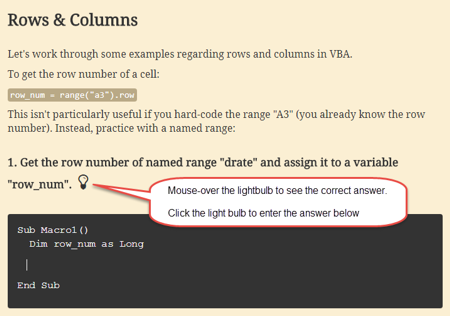
A screen shot from our interactive VBA tutorial.
Our tutorial is designed to get you coding as fast as possible! We'll give you a brief description, show you an example, and then ask you to complete an exercise. We won't go in depth on coding theory, or give needlessly long descriptions. We keep things short and sweet!
Learn VBA Tutorial
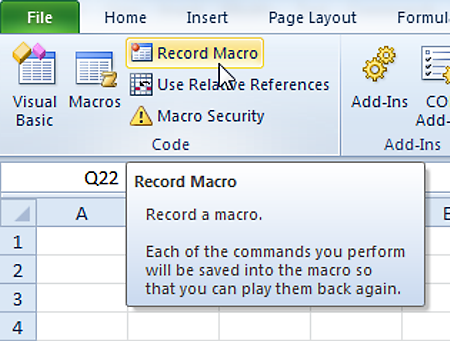
A screen shot of the Macro Recorder in Excel.
Work Faster. Work Better.
Using the Macro Recorder
You can also automate Excel without any coding knowledge by using the Macro Recorder. The Macro Recorder records your actions as VBA code, allowing you to repeat those exact actions again by running the macro.
By using the Macro Recorder, you can "code" some of your actions and then review and edit the code to better fit your needs. This is how many Excel users become introduced to VBA! They slowly learn VBA as they try to adapt macros. We love the Macro Recorder as it helps non-programmers get introduced to VBA, but we strongly recommend going through our VBA Tutorial to save time when trying to adapt macro recorded code.
Our Interactive VBA Tutorial will show you how to automate Excel by using the Macro Recorder.
Learn VBA Tutorial
AutoMacro
Excel Automation Tools
For advanced users, learn about Excel Automation Tools for VBA, Python, SQL, C#, M, Java, C++, and D.
For everyone else interested in Excel automation, we recommend reviewing our AutoMacro add-in:
AutoMacro is designed to make VBA coding easy(er) for everyone. Instead of searching online for example code, simply use the the menus to insert ready-to-use code. Use the advanced code builders to build complex code for your specific needs, without needing to know how to code it yourself!
- VBA Code library - 200+ code fragments for common tasks (insert a column, find last used row, etc.)
- VBA Code Generators - Generate ready-to-use code without knowing any VBA at all. Simply use the code generator interfaces to select your desired options and insert the code directly into the Visual Basic Editor. (See example below)
- Save Your Own Code - Save your own frequently used code fragments or share code with colleagues
- Time-saving Features - Many other time-saving features like shortcuts to bookmark code, indent code, remove excess line-breaks, smart-commenting, and more
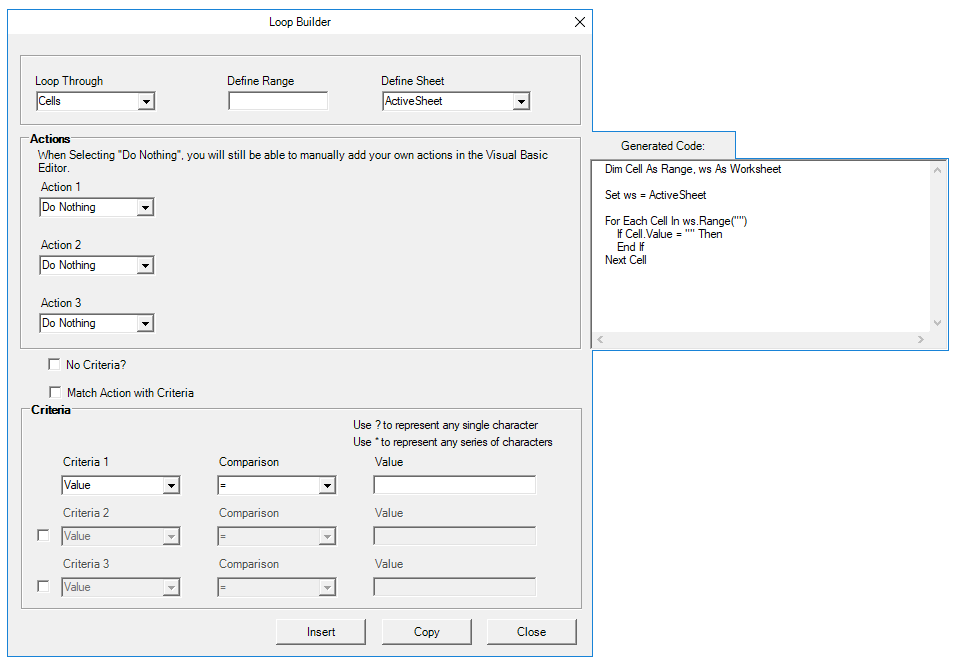
Quickly generate code to loop through objects.
VBA Code Examples
Other Excel Resources!
Other Excel Examples
AutomateExcel contains many other non-VBA/Macro related resources as well. Below you will find links to our amazing, one-of-a-kind, interactive tutorials. Below that you will find links to lists with hundreds of examples for Excel shortcuts, functions, and formulas examples.
You can also visit the Start Here page for a more detailed list of the free resources available at AutomateExcel.