VBA テキストの折り返し


Last updated on 6月 12, 2022
In this Article
このチュートリアルでは、VBAを使用してExcelの文字列の折り返しを有効または無効にする方法について学習します。
VBAを使用してテキストを折り返す
RangeオブジェクトのRange.WrapTextプロパティをTrueに設定することで、セルまたは範囲内のテキストを折り返すことができます。次のコードは、セルA1内のテキストを折り返します。
Worksheets("Sheet1").Range("A1").WrapText = True結果は次のようになります。
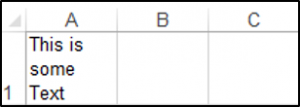
もっと大きな範囲のセルもWrapすることができます。
Range("A1:A10").WrapText = TrueVBAでセル内の折り返しを無効にする
VBAを使用すると、特定のセルまたは範囲でのテキストの折り返しを無効にすることができます。次のコードは、セルB2でのテキストの折り返しを無効にします。
Range("B2").WrapText = Falseワークシート全体の折り返しを無効にする
VBAを使用すると、ワークシート上のすべてのセルでテキストの折り返しを無効にすることができます。以下のコードでは、ActiveSheetのすべてのセルでテキストの折り返しを無効にすることができます。
Sub DisableWrapText ()

    Cells.WrapText = False

End Sub