More WinHTTP/XML fun…
If you have Excel 2003 and use the social bookmarking tool Del.icio.us, you can backup your bookmarks in Excel.
1. Download the Del.icio.us Excel Spreadsheet
2. Press the “Backup Del.icio.us” Button
3. Enter your Del.icio.us Username and Password then click GO!
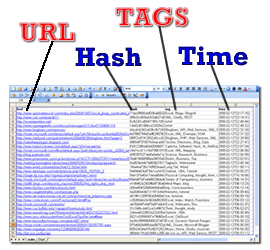
That’s it. Your spreadsheet should now look like the picture.
A few additional benefits:
• Save your data multiple ways; as Excel (.xls), Comma Delimited Text File (.csv) or XML.
• I like having the URL’s as clickable links, so when I do a quick browse if I see something interesting, I click, and I’m taken to the bookmark
• I can do data analysis on my bookmarking behavior if desired, possibly bookmark frequency chart, tag chart, filtering, etc. This requires additional modification.
Notes:
You need to click YES when opening the workbook and prompted to enable macros for things to work correctly. However, if you’re hesitant, the code is unprotected so hit NO, then open the VB editor(alt F11) and inspect the code first.
This workbook makes use of the del.icio.us API, specifically only one call: /api/posts/all.
Update: On May 16, 2006 there was announced a new URL for the del.ico.us API. The spreadsheet has been updated to reflect this. If you downloaded the spreadhsheet prior to May 16, 2006 and arrived here wondering why your old version doesn’t work anymore, simply download again and replace your old file.
You might also like these posts:
2007 Calender Templates
Excel Mortgage Calculator
March 1st, 2005 at 12:03 pm
I found a large collection of all del.icio.us tools at
Absolutely Del.icio.us – Complete Tool Collection
June 15th, 2005 at 5:20 pm
Hi,
I’m looking for a way to grab all the urls into excel from delicious that have been tagged by all users. Can your tool do this? Do you know of one that can?
Thanks
June 15th, 2005 at 6:49 pm
Beth,
I’ve never heard of a tool with the functionality you’re requesting, and guessing this would definitely be considered abusive to their system.
For what data you can get your hands non: Here’s a list of the API functions and acceptable use.
Not sure the reason you need it, but you could always ask the delicious folks directly.
June 17th, 2005 at 7:26 pm
Thanks! A group of professionals who work with nonprofits on technology issues – started a folksonomy experiment — using the nptech tag. Basically an opportunity to collaborative/share urls. We wanted to get a sense of how many uers/urls have been tagged so far. It is for analysis purposes …
June 24th, 2005 at 10:51 pm
Hi
Great Concept but I cannot get it to work. I have my bookmarks in firefox but does that matter?
Thanks
joe
June 25th, 2005 at 5:24 am
Joe, thanks for testing.
Are you using Excel 2003?
Your bookmarks need to be stored in delicious, at a location like http://del.icio.us/username?
The spreadsheet doesn’t retrieve bookmarks from firefox.
August 8th, 2005 at 10:51 pm
Excellent! But how can I restore my backup if delicious loses my bookmarks for whatever reason?
December 20th, 2005 at 2:41 pm
Have you tested or updated this recently? I’ve tried it and can’t get it to run on my machine. Is it WinXP only?
Seems like a good idea but I can’t verify that it works anymore.
Thanks!
December 20th, 2005 at 3:14 pm
Just tested and worked like a charm.
Needs Excel 2003.
December 20th, 2005 at 5:13 pm
Ah, that’s my bad. User error — I’m still using Excel X.
I’ll find someone with 2003 and test it for my own assurance, and then give a fuller endorsement. Thanks!
December 20th, 2005 at 7:23 pm
No problem, hopefully you get it working. It’s pretty fast with
August 25th, 2008 at 11:47 am
Hi
Great Tool! Unfortunately the tool works at home on Excel 2007, but doesnt at my office on Excel 2003. How can that be? Macros are enabled on both machines.
September 2nd, 2008 at 9:06 pm
hey ))
its very reasonable article.
Good post.
realy gj
thank you
January 19th, 2009 at 8:10 am
This is great. Thanks for creating it.