
Backlink Checker for Google and Yahoo In Excel!
Awesome! The first remix of one of my spreadsheets: Backlink Checker for Google and Yahoo!
Claus has taken my Google API Keyword Spreadsheet, gave it a facelift, and added Yahoo backlink results side-by-side with the Google results.
View the top ten results for the search Automate Excel with their Google and Yahoo backlinks in this screenshot:
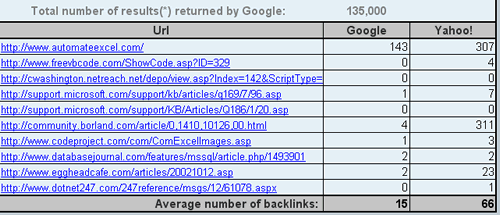
The remixed version is the result of the nice folks at ResearchBuzz posting a link which was then picked up by ThreadWatch, who requested to see a Yahoo version also. Cluas then ran with it.
Note 1: A Yahoo developer key is not required. Notice in the large screenshot I entered foobar for the Yahoo API key and got the same results. I believe they are still throttling 5000 queries/day by IP (Thank You Yahoo).
Note 2: The VBA code requires a password, so any curious coders are out of luck, Claus? (You can download the original to see the google query. Not that a vba password has stopped anybody before 😉
Note 3: If any SEO gurus care to do a follow up post on how to use this data in keyword research, that would be great!
Note 4: The spreadsheets I make available for download are free to build upon provided a link and proper credit is given, and they’re not sold. Any questions, simply shoot me an email.
Note 5: Woops, getting carried away with the notes… Nice job Claus.