


VBA – Run a macro when Excel starts

Written by

Reviewed by
In this Article
Do you need to run a macro when Excel starts? You have two options:
1. Create a Workbook_Open() sub within ‘ThisWorkbook’.
2. Place a Auto_Open() sub within any module.
Workbook_Open Event
Create a sub titled ‘Workbook_Open’ within ‘ThisWorkbook’
Workbook_open ()
    MsgBox "This code ran at Excel start!"
End Sub
Auto_Open
Using the second method: Simply create a subroutine called Auto_Open and place code in it, or call another sub from there. Automatically your code runs when Excel starts.
Private Sub Auto_Open()
    MsgBox "This code ran at Excel start!"
End Sub
Create and Name New Worksheet Everytime Excel Opens
The following code works opening a workbook. It automatically adds a new sheet and labels it with the date. It also checks to see that the sheet doesn’t already exist – to allow for the possibility of it being opened more than once a day.
This code makes use of the Workbook Open Event and must be placed in the workbook module under the “Open work Book” event. The function Sheet_Exist must be placed in a module and this checks whether or not the sheet exists:
Private Sub Workbook_Open()

Dim New_Sheet_Name As String

New_Sheet_Name = Format(Now(), "dd-mm-yy")

If Sheet_Exists(New_Sheet_Name) = False Then
    With Workbook
        Worksheets.Add().Name = New_Sheet_Name
    End With
End If

Save

End Sub
Function Sheet_Exists(WorkSheet_Name As String) As Boolean
Dim Work_sheet As Worksheet
Sheet_Exists = False
For Each Work_sheet In ThisWorkbook.Worksheets
If Work_sheet.Name = WorkSheet_Name Then
Sheet_Exists = True
End If
Next
End FunctionTo download the .XLSM file for this tutorial, click here
Set the Default Sheet When Workbook Opens
Do you want to make sure a sheet always shows first when a workbook opens? For instance when you open a workbook sheet3 is always the active sheet. Here’s how.
You can refer to a sheet from VBA by it’s program name (ie Sheet3) or by it’s tab name(ie JanData). It is best to use the program name, becuase if the tab name changes, your VBA code that refers to a tab name will no longer work. However if you use the program name a user can change the tab name multiple times and your macro still works.
To make sure a certain sheet is always activated when a workbook opens, just place sheet.activate code in the workbook_open sub. This is an example that activates sheet3 by using the program name everytime a workbook opens.
Private Sub Workbook_Open()
Sheet3.Activate
End Sub
And this does it by using the tab name:
Private Sub Workbook_Open()

Sheets("mytabname").Activate
End Sub
Sidenote: You must save and restart excel for this to work.
Sidenote: This only works if macros are enabled.
Sidenote: Put this code in the code window for the ThisWorkbook object in the VBE.
Load Form Every Time Workbook Opens
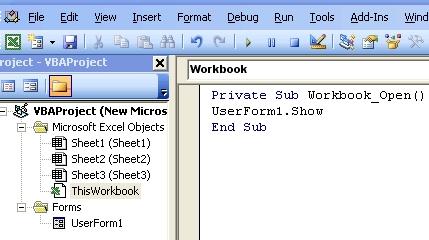
If you would like to load a form or run some VBA code when you open an excel workbook, place your code in the Thisworkbook code window and in the Workbook_Open sub.
From your spreadsheet:
1. Press ALT and F11 to open the VB editor
2. Double-click the word ThisWorkbook to open the code window
3. Type the following code in the ThisWorkbook code window
Private Sub Workbook_Open()
UserForm1.Show
End Sub
Sidenote: Replace Userform1 with your form name
4. Close Excel and re-open.
VBA Coding Made Easy
Stop searching for VBA code online. Learn more about AutoMacro – A VBA Code Builder that allows beginners to code procedures from scratch with minimal coding knowledge and with many time-saving features for all users!



