


VBA Worksheet Change Event – Run a Macro When a Cell Changes

Written by

Reviewed by
Worksheet_Change Event
You may want to run a macro when a cell changes. A popular use of this ability is to have custom code validate a cell after a change is made. It’s easy to do this by using the worksheet objects change event.
In the Visual Basic Editor you must first double click the sheet name where the cell changes that activates the macro. This opens the code window for that sheet object. In this case I wanted to run a macro when a cell in Sheet1 changes.
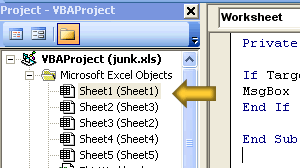
After opening the code window for the Worksheet you place your code in the Worksheet_Change event. The following example will display a message box if the contents of cell A1 change. First the subroutine fires if any cell changes, then the use of an IF..Then statement will run the code only if cell A1 was the cell that changed based on the If…Then.
Private Sub Worksheet_Change(ByVal Target As Range)


If Target.Address = "$A$1" Then

     MsgBox "This Code Runs When Cell A1 Changes!"

End If


End Sub
You can place your code directly in the Worksheet_Change subroutine or call another macro from there.
VBA Coding Made Easy
Stop searching for VBA code online. Learn more about AutoMacro – A VBA Code Builder that allows beginners to code procedures from scratch with minimal coding knowledge and with many time-saving features for all users!



