VBA Set Column Width or Row Height

Written by

Reviewed by
In this Article
This tutorial will demonstrate how to set row height and column widths using VBA.
Excel Row heights and Columns widths can be changed in VBA by setting the .RowHeight and .ColumnWidth properties.
Set Column Width with VBA
Macro to set the column width of Columns A to E:
Sub Column_Width()
    Columns("A:E").ColumnWidth = 30
End Sub
Set Row Height with VBA
Macro to set the row height of Row 1:
Sub RowHeight()
    Rows("1:1").RowHeight = 30
End Sub
Autofit Column Width
Excel offers the ability to “Autofit” column widths. This feature adjusts the column width so that the column(s) is wide enough to fit all text found in that column.
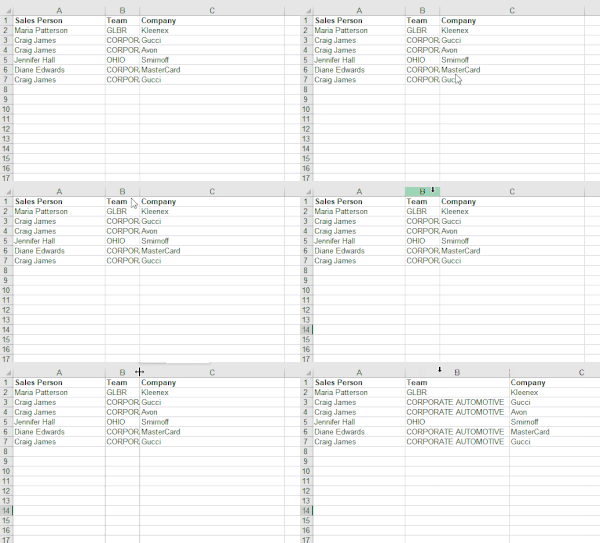
To Autofit column widths in VBA:
Columns("A:B").AutofitWe wrote more about this in another article on how to Autofit a Column from VBA, including how to Autofit all used columns.
Autofit Row Height
You can also autofit row heights using a similar method:
Rows("1:2").AutofitSet Cell Width
You can also adjust column widths by referencing a cell:
Range("a1").EntireColumn.ColumnWidth = 20Set Cell Height
Or adjust row heights by referencing a cell:
Range("a1").EntireRow.RowHeight = 10Obtain Column Width
To obtain the column width of a column:
dim iColumnWidth as long
iColumnWidth = columns("a").ColumnWidth
Note: This will return Null if all columns in the range do not have the same width.
Obtain Row Height
Similarly, you can obtain the row height:
dim iRowHeight as long
iRowHeight = rows("1").RowHeight
VBA Coding Made Easy
Stop searching for VBA code online. Learn more about AutoMacro – A VBA Code Builder that allows beginners to code procedures from scratch with minimal coding knowledge and with many time-saving features for all users!