


VBA – WinHttpRequest with Login and Password

Written by

Reviewed by
This article demonstrates how to use VBA for a WinHttpRequest with Login and Password.
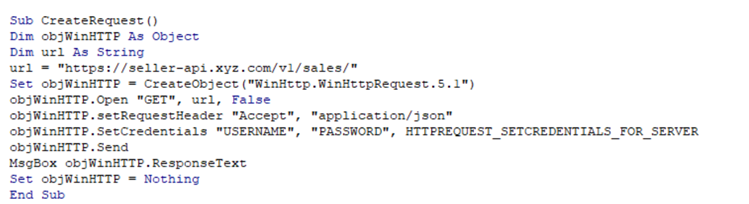
WinHTTP Request – Late Binding
- You can declare your WinHttpRequest variable as an object which means that you do not have to add a reference to your VBA project in order for your code to work.
Dim objWinHTTP As Object
Set objWinHTTP = CreateObject("WinHttp.WinHttpRequest.5.1")
- Once you have declared your object, you can assign the URL you are targeting to a string variable and then send a GET request.
Dim url As String
url = "https://seller-api.xyz.com/v1/sales/"
objWinHTTP.Open "GET", url, False
- At this stage, depending on the API that you are targeting, you can set you request header and /or credentials where you would change USERNAME and PASSWORD to the username and password provided.
objWinHTTP.setRequestHeader "Accept", "application/json"
objWinHTTP.SetCredentials "USERNAME", "PASSWORD", HTTPREQUEST_SETCREDENTIALS_FOR_SERVER
- You can then send the request.
objWinHTTP.Send
- A message box can return the response to the request.
WinHTTP MsgBox objWinHTTP.ResponseText
- Finally, you can clear the object variable.
Set objWinHTTP = Nothing
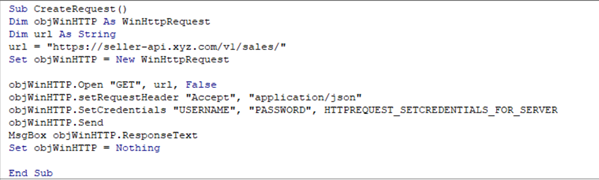
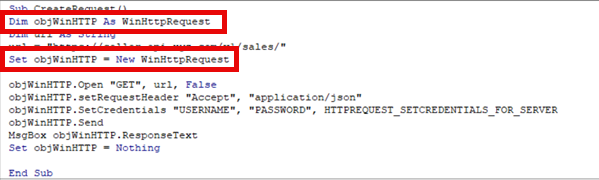
The entire code should look like the example below:
Request – Early Binding
To use early binding, we need to replace the variable that is set to an object as a WinHttpRequest object.
Dim objWinHTTP As WinHttpRequest
Set objWinHTTP = New WinHttpRequest
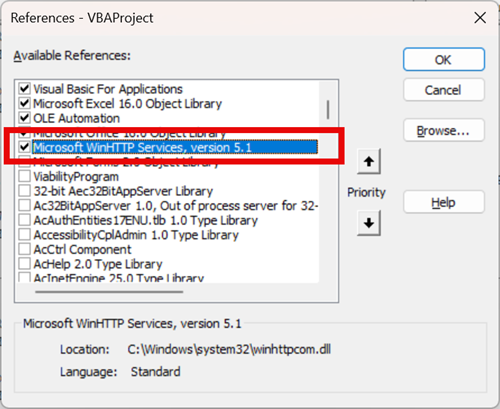
In order to do this, you need to add the following reference to your VBA project.
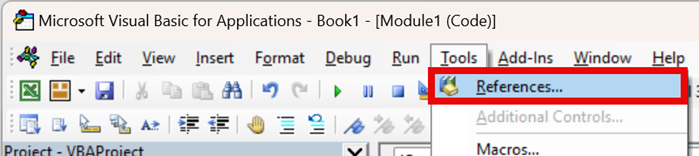
- In the VBE, in the menu, select Tools > References.
- Select Microsoft WinHTTP Services, version 5.1 and then click OK.
- Now, in your code, declare your object as a WinHttpRequest and then set the object as a New WinHttpRequest.
Notes:
Set a reference to Microsoft WinHTTP Services
Replace USERNAME and PASSWORD with your own info.
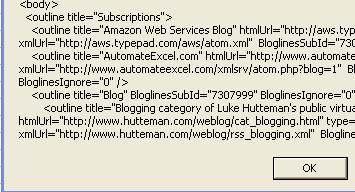
This returns the XML to a msgbox for demonstration, you can import it a map or load it to a MSXML2.DOMDocument(I’ve got working code, I’m still experimenting, I’ll follow up). Here is a snippet of the msgbox:
VBA Coding Made Easy
Stop searching for VBA code online. Learn more about AutoMacro – A VBA Code Builder that allows beginners to code procedures from scratch with minimal coding knowledge and with many time-saving features for all users!



