Get Current Weather in Excel
I was just browsing the article 15 things you can do with RSS and noticed that WunderGround provides an RSS feed for weather (the option is available after doing a search).
Knowing that RSS is consumable with Excel (XML versions), I whipped up a barebones* example of getting the current and daily forecasted weather into Excel.
You can download the Weather Spreadseet here.
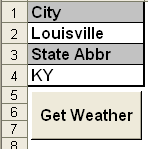
Simply enter a City and State and hit the “Get Weather” button. If the inputs are valid, your spreadsheet will return data looking something like this:
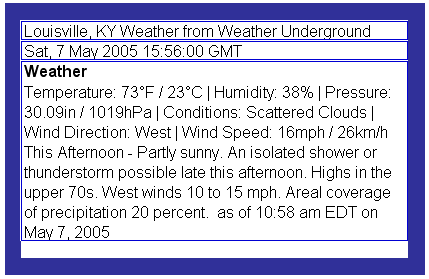
Looks like possible rain for the running of the derby today
*This is a barebones example to demonstrate how to get weather into Excel. I included only an “On Error Resume Next” instead of detailed error handling, and the weather is returned as single string (ideally this string would be parsed).
Get answers right away at our AE Excel Support Forums!


Mark,
I had trouble getting the weather workbook to work. I am working on Excel XP on Windows 2000 Professional. When I click the button to get the weather, nothing happens. When I remove the On Error line, I get an error with the XMLMaps(“weather”).
Is there something I can do to fix this?
Thank you.
David
David,
Thanks for testing it out, unfortunately I don’t have Excel XP currently installed, however a quick search turned up this:
It looks like to import a URL you need to use DATABINDING. You can read more on it about halfway down on this page.
Just a guess:
Change this line of code
ActiveWorkbook.XmlMaps(“weather”).Import URL:=”http://www.weatherunderground.com/auto/rss_full/” & _
state2search4 & “/” & city2search4Corrected & “.xml”
To this
ActiveWorkbook.XmlMaps(“SalesOrder”).DataBinding.LoadSettings _
URL:=”http://www.weatherunderground.com/auto/rss_full/” & _
state2search4 & “/” & city2search4Corrected & “.xml”
‘return it
ActiveWorkbook.XmlMaps(“weather”).DataBinding.LoadSettings _
URL:=”http://www.weatherunderground.com/auto/rss_full/” & _
state2search4 & “/” & city2search4Corrected & “.xml”
ActiveWorkbook.XmlMaps(“weather”).DataBinding.Refresh
That works in 2003 also, and according to the article I linked to should work for you,, let me know how things turn out.
mark
If anyone is getting an Access Denied error it is because the website URL has changed from this original posting. it is now ‘wunderground.com’
I got the code to work substituting the new URL for the old, but all the current conditions are concatenated to a single line with ” | ” characters and the occasional hex.
Is there an easy way to parse this line and display it correctly?
SO will this work with Office 2003? I will press the button and nothing happens. When I go to the Module, Im getting errors on the first “/” in “url:=”http://”. Amazing concept though. I run a retail chain and I would love to autopopulate weather stats into my Performance chart before I send it to home office!
-Jordie
Hi,
How can I get this to retrieve Canadian cities weather?
Thank you