
Geocode an Address using Excel and Geocoder.us
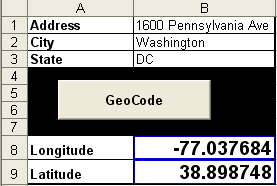
I’ve been experimenting with the Google Maps API lately and find myself frequently visiting Geocoder.us to geocode addresses to latitude and longitude.
GeoCode: “A geocode is a geographical code to identify a point or area at the surface of the earth.”
In the process I developed a spreadsheet that would look up the latitude and longitude of a given address via geocode.us and return the result to Excel.
Here’s a stripped down version which will return the geocoded results for one address: Download the Geocode Spreadsheet.
Related: Google Maps in Excel


freakin awesome… a hugh help… thank you
Is there a way that I could do this with multiple addresses?
For example it would select address #1 from say, cell C4 and return the coordinates to D4 and E4, then move down to C5 to use the next address (loop).
Not sure how it would be done but i would imagine setting variables to cells and making relative adjustments to the original cell location would possibly work. Any idea?
Thanks a lot!
Great code and very useful! However, upon inspecting your macro’s code, I wonder… should’nt you also use REPLACE() to substitute +’s for spaces in the City field as well? Some city names have multiple words.
I just figure that’s what you’re trying to do while formatting the &Address&City… portion of your ImportURL command.
I have a excel file needing to be convertered to KML google file.can you do it. here is a sample.I been using ww.batchgeocoding.com but i can’t handle over 2,000 per run. i have about 3-4,500 per excel file.
James,
Were you able to locate a solution? I have the same issue.
Thanks
I am having trouble getting this to work in Office XP. It keeps returning a code ’438′ Object doesn’t support this property or method.