VBA – Conditional Formatting – Highlight Duplicates in a Range

Written by

Reviewed by
In this Article
Conditional Formatting – Highlight Duplicates
To highlight all duplicate values in a range you will use Excel’s Conditional Formatting feature. Simply follow these steps:
1. Select the range containing the duplicate values. Note: if working with a table of data, only select the unique IDs.
2. Open the Conditional Formatting Menu and select Highlight Duplicates (Alt > H > L > H > D)
Find and Highlight All Duplicates in Range with VBA
Update: Depending on your intention, the code below may no longer be necessary. As discussed above, the same can be accomplished using Excel’s Conditional Formatting feature. However, you may still find this functionality useful to find duplicate values when working within VBA.
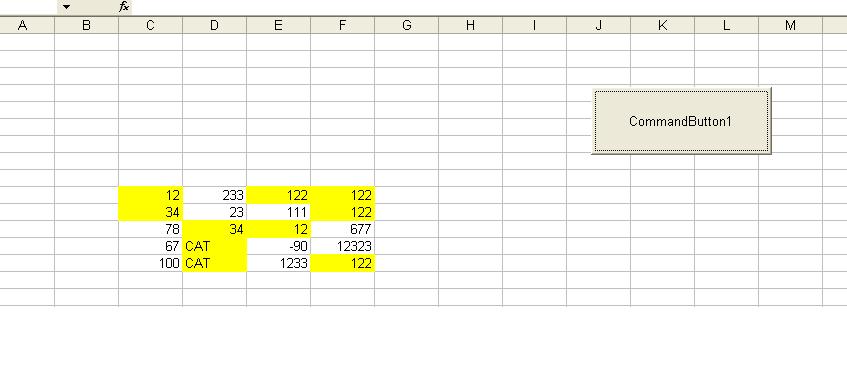
The following subroutine will highlight all the duplicate values in range in yellow. It does not matter whether the values are text or numbers. It uses Excel’s COUNTIF function to count up the duplicates and then sets the colour to yellow:
Sub Highlight_Duplicates(Values As Range)
Dim Cell

For Each Cell In Values
    If WorksheetFunction.CountIf(Values, Cell.Value) > 1 Then
        Cell.Interior.ColorIndex = 6
    End If

Next Cell
End Sub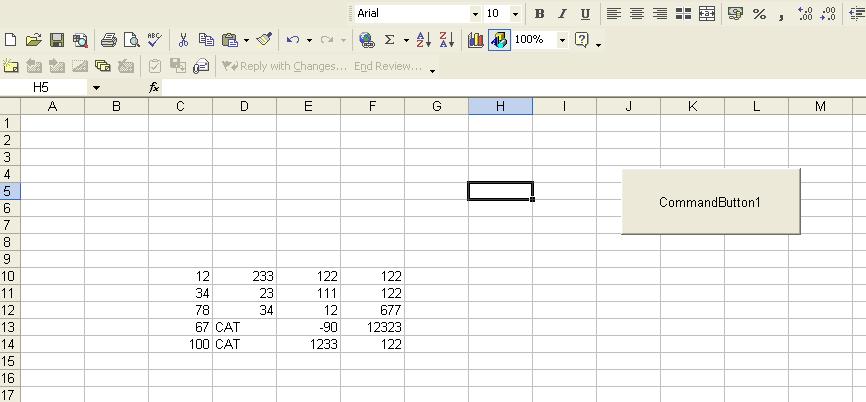
and then if we press the button we see all the duplicates:
To download the .XLS file with this tutorial, click here
VBA Coding Made Easy
Stop searching for VBA code online. Learn more about AutoMacro – A VBA Code Builder that allows beginners to code procedures from scratch with minimal coding knowledge and with many time-saving features for all users!