VBA – Convert Matrix to Vector

Written by

Reviewed by
Convert Matrix to a Vector
This is the opposite tutorial of the Converting a Single Row Vector into a Matrix tutorial.
The following function will take a range as a matrix and convert it to a single column vector:
Option Explicit
Function Create_Vector(Matrix_Range As Range) As Variant
Dim No_of_Cols As Integer, No_Of_Rows As Integer
Dim i As Integer
Dim j As Integer
Dim Cell
No_of_Cols = Matrix_Range.Columns.Count
No_Of_Rows = Matrix_Range.Rows.Count
ReDim Temp_Array(No_of_Cols * No_Of_Rows)
'Eliminate NULL Conditions
If Matrix_Range Is Nothing Then Exit Function
If No_of_Cols = 0 Then Exit Function
If No_Of_Rows = 0 Then Exit Function

For j = 1 To No_Of_Rows
    For i = 0 To No_of_Cols - 1
    Temp_Array((i * No_Of_Rows) + j) = Matrix_Range.Cells(j, i + 1)
    Next i
Next j
Create_Vector = Temp_Array
End Function
So for example the vector:
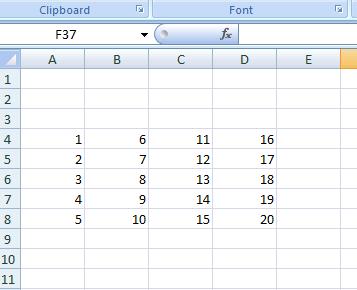
Will become:
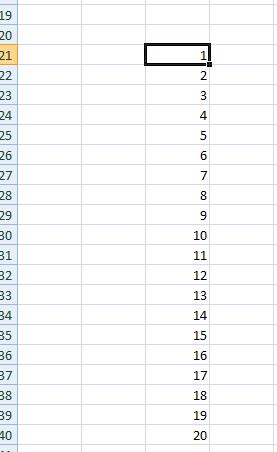
Where we have used the following subroutine to print out the vector:
Private Sub CommandButton1_Click()
Dim Vector
Dim k As Integer
Vector = Create_Vector(Sheets("Sheet1").Range("A4:D8"))
For k = 1 To UBound(Vector)
        Sheets("Sheet1").Range("B20").Offset(k, 1).Value = Vector(k)
Next k
End Sub
Note that these routines work on both numbers and text.
To download the .XLSM file from this tutorial, click here.
Convert Single Row Vector into a Matrix
This is the opposite pf above.
The following function takes a single row vector and converts into a matrix:
Function Create_Matrix(Vector_Range As Range, No_Of_Cols_in_output As Integer, No_of_Rows_in_output As Integer) As Variant>ReDim Temp_Array(No_Of_Cols_in_output, No_of_Rows_in_output)
Dim No_Of_Elements_In_Vector As Integer
Dim Col_Count As Integer, Row_Count As Integer
Dim Cell
No_Of_Elements_In_Vector = Vector_Range.Rows.Count
'Eliminate NULL Conditions
If Vector_Range Is Nothing Then Exit Function
If No_Of_Cols_in_output = 0 Then Exit Function
If No_of_Rows_in_output = 0 Then Exit Function
If No_Of_Elements_In_Vector = 0 Then Exit Function
For Col_Count = 1 To No_Of_Cols_in_output
    For Row_Count = 1 To No_of_Rows_in_output
    Temp_Array(Col_Count, Row_Count) = Vector_Range.Cells(((No_of_Rows_in_output) * (Col_Count - 1) + Row_Count), 1)
        Next Row_Count
Next Col_Count
Create_Matrix = Temp_Array
End Function
The function takes 3 arguments:
• The range of the initial vector
• The number of rows required in the matrix
• The number of columns required in the matrix
So if we have:
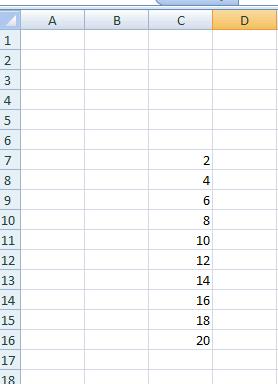
Then we can call our function:
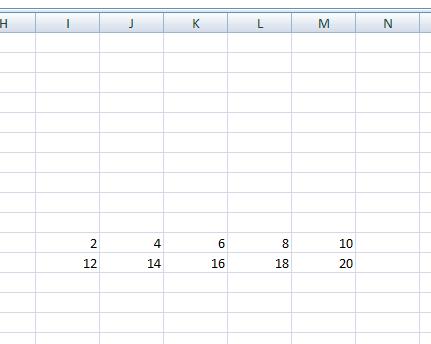
Convert_to_matrix(c7:c16,2,5)
Where:
1. c7:c16 is the matrix range
2. 2 is the number of rows required in the matrix
3. 5 is the number of columns required
And we get: