


VBA Drop Down List (Data Validation)

Written by

Reviewed by
In this Article
This tutorial will demonstrate how to use Data Validation to work with drop-down lists in Excel using VBA.
Excel Data Validation allows you to limit what value(s) may be entered in a cell or range. You can limit entries to positive integers, text, dates, and much more. In this tutorial, we are going to look at how to create a Data Validation Drop-Down List in a cell using VBA.
Note: An alternative to a Data Validation Drop-Down list is a ListBox object. ListBoxes can be added to Excel worksheets. ListBoxes can trigger macros that run every time a ListBox value is changed. ListBoxes are also used in VBA Userforms.
Creating a Drop Down List Using VBA
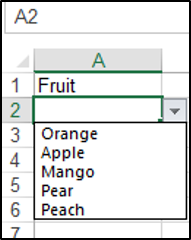
We have the text Fruit in cell A1, and we are going to create a drop-down list in cell A2, with five entries.
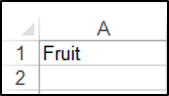
We will use the Validation.Add method and specify that the Type parameter is xlValidateList. You can add the specific items you would like in your list using the Formula1 parameter.
The following code will create a data validation drop-down list in cell A2:
Sub DropDownListinVBA()

Range("A2").Validation.Add Type:=xlValidateList, AlertStyle:=xlValidAlertStop, _
Formula1:="Orange,Apple,Mango,Pear,Peach"

End Sub
The result is:
Populate a Drop Down List From a Named Range in VBA
You can use a named range containing the items, to populate a drop-down list in VBA. We have the named range Animals shown below:
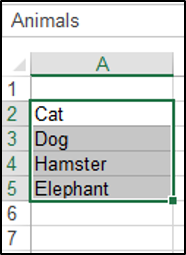
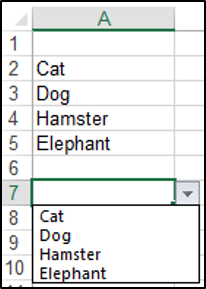
We have to set the Formula1 parameter equal to the named range. The following code will create a data validation drop-down list in cell A7 based on the items in the named range:
Sub PopulateFromANamedRange()

Range("A7").Validation.Add Type:=xlValidateList, AlertStyle:=xlValidAlertStop, _
Formula1:="=Animals"

End Sub
The result is:
Removing the Drop Down List
You can use the Validation.Delete method to remove the drop-down list from the cell. The following code would remove the drop-down list from cell A7 in the example above:
Sub RemoveDropDownList()

Range("A7").Validation.Delete

End Sub
VBA Coding Made Easy
Stop searching for VBA code online. Learn more about AutoMacro – A VBA Code Builder that allows beginners to code procedures from scratch with minimal coding knowledge and with many time-saving features for all users!



