
MID Function Examples – Excel, VBA, & Google Sheets

Written by

Reviewed by
Download the example workbook
This tutorial demonstrates how to use the Excel MID Function in Excel to extract text from a cell.
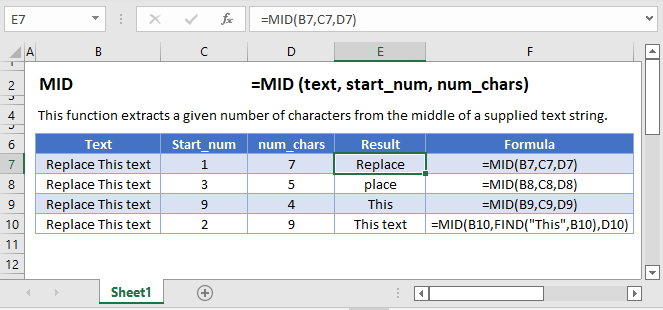
How to use the MID Function in Excel:
The MID function extracts a specific number of characters you specify from anywhere you want.
=MID(B3,C3,D3)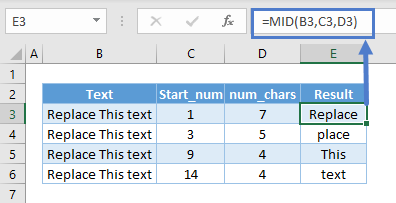
It can start from any number seen in column C and return any number of characters in column D.
MID to Grab String Between Different Delimiter
If the string you want is between two different delimiters, this is a pretty straightforward one. For instance, we might want the string between dash (“-”) and slash (“/”).
=MID(B3,FIND("-",B3)+1,FIND("/",B3)-FIND("-",B3)-1)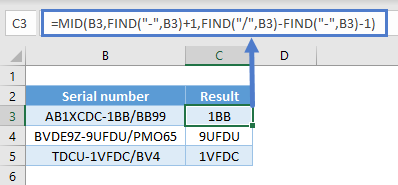
In this case here, we can use FIND to check which character position the dash starts and add 1 to start extracting from there.
Use FIND again to check which character position the slash starts and minus the position of the dash and 1 to obtain the length of the string we want.
You can also use SEARCH. The difference between FIND and SEARCH is that the former is case-sensitive. Finding a symbol such as space wouldn’t matter.
=MID(B3,FIND("-",B3)+1,SEARCH("/",B3)-SEARCH("-",B3)-1)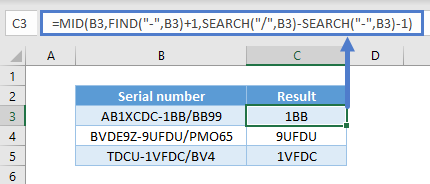
MID to Grab String Between the Same Delimiter
If the string has the same delimiter, it is a little tougher than the one above because FIND grabs the first occurrence. For instance, we might want the string between the first and second spaces. But you can indicate a starting position in FIND as well.
=MID(B3,FIND(" ",B3)+1,FIND(" ",B3,FIND(" ",B3)+1)-FIND(" ",B3)-1)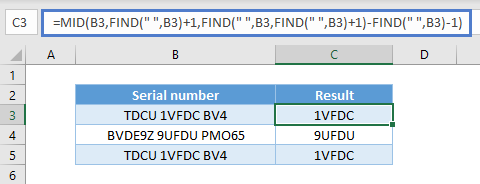
It uses FIND just like the above example to check which character position the space starts and add 1 to start extracting from there.
Use FIND again to check which character position the second space starts by starting to find 1 character after the position of the first space.
And lastly minus the position of the first space and 1 to obtain the length of the string we want.
You can also use SEARCH as well.
=MID(B3,FIND(" ",B3)+1,SEARCH(" ",B3,FIND(" ",B3)+1)-SEARCH(" ",B3)-1)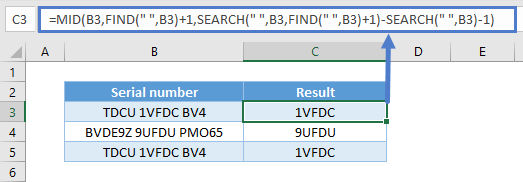
MID with Numbers / Dates
Note that MID is a text function and will always return a text value, Numerical functions won’t work:
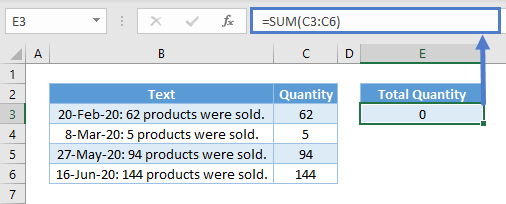
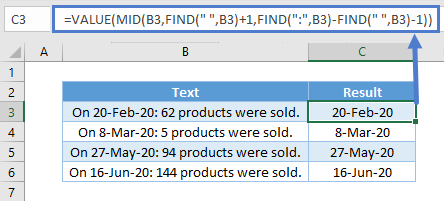
To overcome the issues above, you can use the VALUE Function to convert from text to values.
=VALUE(MID(B3,FIND(":",B3)+2,FIND(" ",B3,FIND(" ",B3)+1)-FIND(":",B3)-2))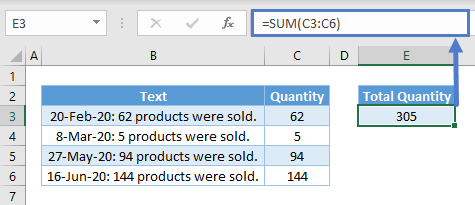
MID to Split by Common Delimiter
You might want to split all the words in different rows. Hence:
=TRIM(MID(SUBSTITUTE(B$3," ",REPT(" ",LEN(B$3))),(ROWS(B3:B$3)-1)*LEN(B$3)+1,LEN(B$3)))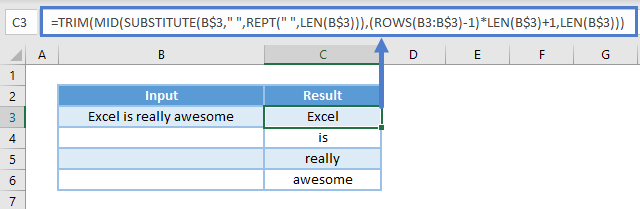
What is does is use SUBSTITUTE to substitute all the spaces with an influx of repeated spaces using REPT. It results in the text looking like this:
“Excel is really awesome”
The influx of repeated is carefully repeated with a total length of the original text by using LEN. That means the position number to start extracting from is a multiple of the total length. For the first word, extract from position 1. For the second, it will be total length + 1. For the third, total length x 2 + 1. Etc. To get the nth word, use ROWS.
Lastly, the number of characters is always using the total length of the original text.
Find Nth word in the String
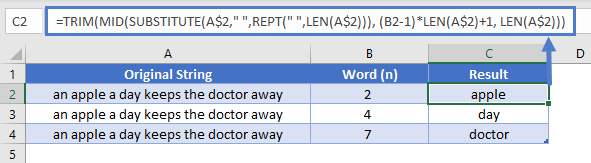
We could combine TRIM, LEN, SUBSTITUTE, REPT with MID as follows to get last word of the string.
=TRIM(MID(SUBSTITUTE(A$2," ",REPT(" ",LEN(A$2))), (B2-1)*LEN(A$2)+1, LEN(A$2)))Which would give us the following results:
Reverse a text string
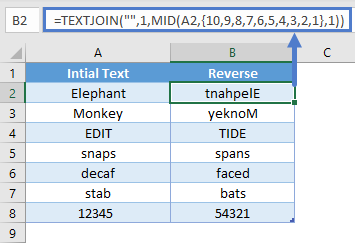
You can reverse a text string by combining MID function with TEXTJOIN as follow.
=TEXTJOIN("",1,MID(A2,{10,9,8,7,6,5,4,3,2,1},1))Which would give us the following results:
MID in Google Sheets
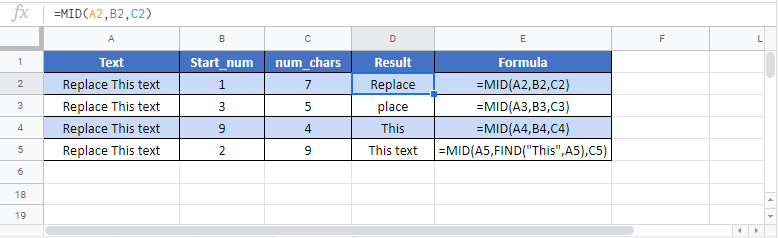
The MID Function works exactly the same in Google Sheets as in Excel:
MID Examples in VBA
You can also use the MID function in VBA. Type:
application.worksheetfunction.mid(text,start_num,num_chars)For the function arguments (text, etc.), you can either enter them directly into the function, or define variables to use instead.

